Five thousand flyers, two pull-up banners, and a QR code that lands on a 404 page. It happens to real businesses constantly, and it almost never happens because the generator malfunctioned. It happens because someone pasted the wrong link, used a shortened URL that later died, or grabbed a staging address that required a login — and nobody scanned the proof before the print run.
Here's the uncomfortable truth about QR codes: the pattern is just text in a machine-readable costume. When you create a URL QR code, the only thing inside those black and white squares is the exact string of characters you handed over. There's no registry, no lookup service, no safety net. Encode the right string and every scan lands exactly where you planned. Encode the wrong one and the code works perfectly while failing completely.
The difference between those two outcomes is about ten extra minutes of care, spread across a handful of decisions. This guide walks through each one: which URL to encode, which type of code to build, how to format and style it, and how to test it before it costs you money.
Why a Perfect URL Matters More Than a Pretty Code
A QR code is a bridge between a physical surface and a web page. When someone scans yours, their phone decodes the pattern back into text, sees that the text starts with a web address, and opens a browser. That entire journey — scan, decode, resolve, load — depends on the URL being correct, live, and reachable by a stranger on a phone. If any link in that chain breaks, the bridge leads nowhere.
The costs of a broken bridge scale with whatever you printed the code on. A run of 500 flyers is embarrassing and cheap to redo. A QR code baked into 40,000 units of product packaging, a vehicle wrap, or signage that's already installed is a different category of problem — you can't recall it, and reprinting isn't measured in dollars so much as in the campaign you no longer get to run.
The quieter cost is the one you never see. A person who scans your code and hits an error page doesn't email you about it. They shrug, pocket their phone, and you've lost them. And make no mistake about what a scan represents: someone stopped walking, took out their phone, aimed a camera at your code, and waited. That's far more commitment than a casual click. Failed scans are invisible in every analytics tool on earth — you simply never get the traffic you paid to print for.
So reframe the goal. You aren't trying to make a QR code. You're trying to guarantee that a specific person, holding a specific phone, standing in front of your poster in imperfect light, ends up on a specific page of your website in under three seconds. The code is the easy part. The URL inside it is where the failures live.
Static vs. Dynamic URL QR Codes: The Decision You Make First
Every URL QR code you'll ever create falls into one of two camps, and you choose the camp before you paste anything. The choice determines what you can fix later, so it's worth understanding the mechanism rather than just the label.
A static QR code encodes your destination URL directly into the pattern. The characters of the address are the code. That's simple and dependable — but it means the destination is permanent. Change your mind, fix a typo, or move the page, and the printed code becomes a dead artifact. The only edit available is a reprint.
A dynamic QR code encodes a short redirect URL hosted by your QR provider instead. When someone scans it, their phone opens that short address, the provider's server logs the scan, and then issues an HTTP redirect that forwards the browser to your real destination. Because the final destination lives in a dashboard rather than in the pattern itself, you can change it whenever you want. The printed code never changes — only where it points.
That redirect hop costs a fraction of a second and introduces a dependency: a dynamic code works only as long as your account with the provider is active and their redirect service is running. That's the honest trade-off. In exchange, you get the two things that matter most in real-world use: the ability to fix a mistake after printing, and scan analytics — counts, times, rough locations, device types — that static codes simply cannot produce.
My position, after watching this go wrong more than once: use a dynamic code for anything public-facing, anything printed in quantity, and anything tied to a campaign. Reserve static codes for personal one-offs, Wi-Fi access cards, and genuinely permanent identifiers like serial numbers or engraved plates, where zero dependencies is the whole point. If there's even a small chance the destination changes — a rebrand, a moved page, an ended promotion — dynamic pays for itself the first time it saves a print run. QR Code Machine's homepage generator produces static codes for free, and its Premium plans add dynamic codes with analytics.
| Feature | Static QR Code | Dynamic QR Code |
|---|---|---|
| Editability | No — URL is fixed at creation | Yes — destination can be changed anytime |
| Scan analytics | None from the code itself | Yes — scan counts, time, location, device |
| Lifespan | Works indefinitely, no account needed | Subscription-dependent — dies if the account lapses |
| Initial setup | Simpler — paste URL, download | Slightly more involved — managed from a dashboard |
| Best for | Permanent info like serial numbers, personal use | Marketing, business cards, packaging, any public-facing material |
One nuance worth keeping in your back pocket: a static code can still send tagged traffic to your website analytics if you build tracking parameters into the URL — your site sees the visit. What you don't get is provider-side scan data. Dynamic codes give you both.
Anatomy of a URL: Copying the Link That Actually Works
Most broken QR codes were broken at the copy-paste step, weeks before anyone scanned them. The fix is understanding what a URL is made of, because each component carries its own failure mode. Take this example address apart:
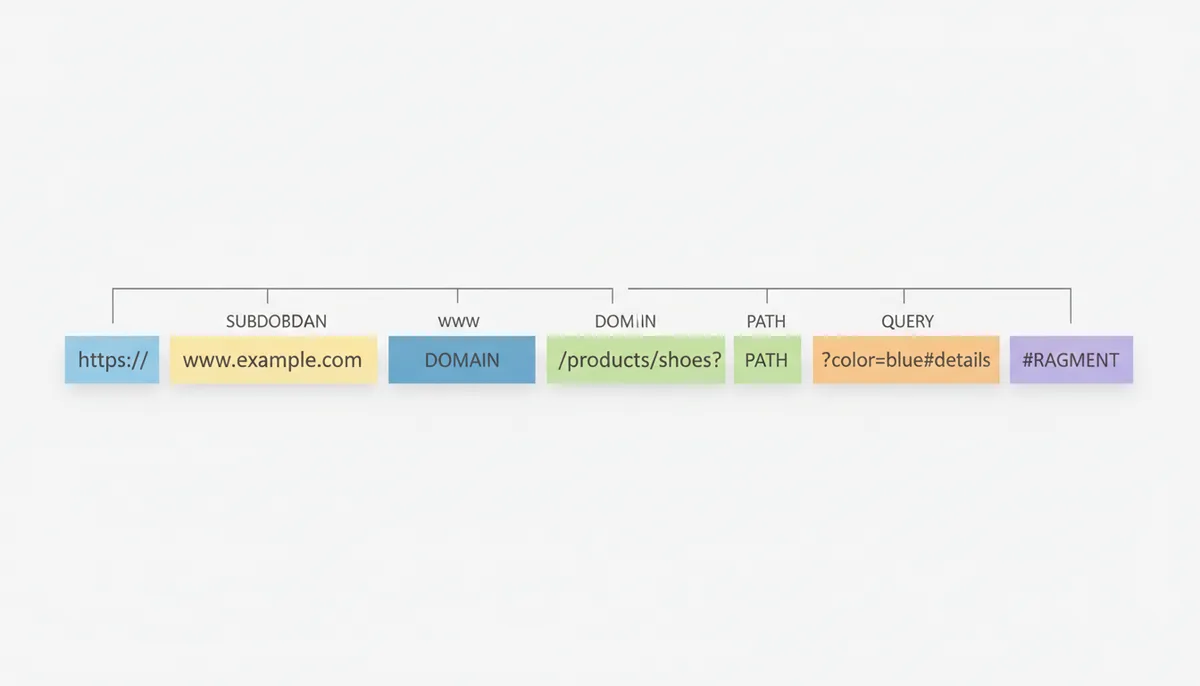
- Protocol — https://. Insist on HTTPS. Modern browsers label plain-HTTP pages as "Not secure," and a meaningful slice of your scanners will back out at that warning. If your site doesn't load over HTTPS, fix that before you print anything.
- Subdomain — www. Sounds trivial, but example.com and www.example.com can serve different content, and blog., shop., or app. subdomains are effectively different sites. Copy the exact version you verified. One specific trap: don't encode a mobile subdomain like m.example.com. Use the canonical address and let your site serve the mobile layout itself, or you'll send desktop scanners to a phone-formatted page.
- Domain — example.com. Domain names are case-insensitive, so this part is low-risk. Typos are not — one transposed letter and you've printed a code for a domain you don't own.
- Path — /products/shoes. Paths can be case-sensitive depending on the server. /Products/Shoes may return a 404 where /products/shoes loads fine. This is why you copy URLs and never retype them.
- Query string — ?color=blue. Everything after the question mark, formatted as key=value pairs joined by ampersands. This is where danger lives. If the URL you copied contains a session ID, a preview flag, or an editing-mode parameter, it will expire or fail for everyone except you. A URL that works in your browser while you're logged in proves almost nothing about what a stranger will see.
- Fragment — #details. The fragment controls where the browser scrolls on the page and is never sent to the server. It's harmless — keep it if you want scanners to land on a specific section, drop it if you don't.
The reliable method is boring and bulletproof: open the destination page yourself in a fresh private or incognito browser window — private mode logs you out, which exposes login-gated and session-dependent pages immediately. Confirm the page is exactly what a first-time visitor should see. Then copy the entire address straight from the address bar.
Four mistakes account for nearly every bad QR code link I've encountered:
- Copying from a Google results page. That link is a Google redirect wrapper, not your URL. Click through to the page first, then copy.
- Copying a shortened link. A URL shortener adds a middleman between the scan and your page. If the shortener service changes its terms or shuts down, every static code you printed dies with it. For static codes especially, encode the full, final URL.
- Copying from a staging environment. staging.example.com works beautifully in the office and requires authentication — or goes offline entirely — for the public. Codes have been printed on conference banners pointing at staging sites. Verify the production address.
- Copying a truncated link. URLs pasted into email or chat tools get line-wrapped and cut. If the copied string doesn't end where the original ended, you'll encode half a path and print a 404.
Step-by-Step: How to Make a QR Code for a Website Link
With the right link sitting on your clipboard, turning a link into a QR code is the quick part — the care you took in the previous section is what makes the output trustworthy. Here's the full procedure, whether you're using a dedicated QR code generator for URLs or the one built into a broader tool:
- Verify the destination one final time. Paste the URL into a private or incognito browser window. The check: the page loads while you're logged out and shows exactly what a first-time visitor should see. If you get a login screen, a personalized view, or anything that differs from your normal browsing session, stop — that URL depends on your session and will fail for everyone else.
- Choose static or dynamic. The decision comes down to one question: could this destination need to change within the lifetime of whatever you're printing? Anything public-facing, campaign-related, or printed in quantity gets a dynamic code. Permanent identifiers and personal one-offs get static. If you're hesitating, that hesitation is your answer — go dynamic.
- Select the URL type and paste the address. In the generator, choose the URL or Website type so scanners know to open a browser, then paste the complete address including the https://. The check: paste, never retype, and then compare the last fifteen characters of what you pasted against your address bar. Truncated pastes are how half-paths end up in print. If the tool auto-fills a protocol, confirm the result doesn't read https://https://.
- Name and save the code (dynamic only). Name it by placement and campaign — "Lobby-Poster-July" — so you can locate it among dozens of codes next year. The check: after saving, find the code in your dashboard and confirm its redirect currently resolves to your page. A dynamic code pointing at a placeholder or an empty field is still a wrong-page scan; it just fails through extra steps.
- Choose the error correction level. Use H if you're adding a logo or printing on anything that scuffs, folds, or gets handled. Q or M is fine for clean digital display. The check: understand the cost before you commit — higher correction means a denser pattern and a larger minimum print size, which constrains the next steps.
- Style within the limits. Dark modules on a light background, the quiet zone intact, any logo small and centered. The quick check: view the code at arm's length. If you can't instantly tell the dark squares from the light background, a phone camera in bad light can't either. The full set of rules lives in the next section.
- Download in the right format. SVG for anything going to a professional printer, since vectors scale losslessly; PNG for websites, email, and screens; PDF if your print shop requests it. The check: never enlarge a small PNG to fit a layout. Pixelated edges destroy scannability — if the code needs to be bigger, export the vector or regenerate at a higher resolution.
- Place it in the design at a scannable size. A widely used rule of thumb: comfortable scanning distance is roughly ten times the code's width. A code scanned at arm's length on a flyer can be around 2 to 3 centimeters wide; one on a poster viewed across a room needs to be far larger, and dense long-URL patterns need more still. The check: confirm the quiet zone survives placement. Designers crop margins to fit tight grids, and a cropped quiet zone is a code that fails at the worst moment.
- Test before anything ships. Scan a physical proof with at least one iPhone and one Android device, and confirm the page that opens is the exact page you intended. The check: nothing goes to print or gets published until the physical version passes. The full testing protocol — lighting, angles, apps — comes in its own section shortly.
Two of these steps — styling and testing — cause more real-world failures than the other seven combined, so each one gets a deeper treatment next.
Why a Long URL Makes Your QR Code Harder to Scan
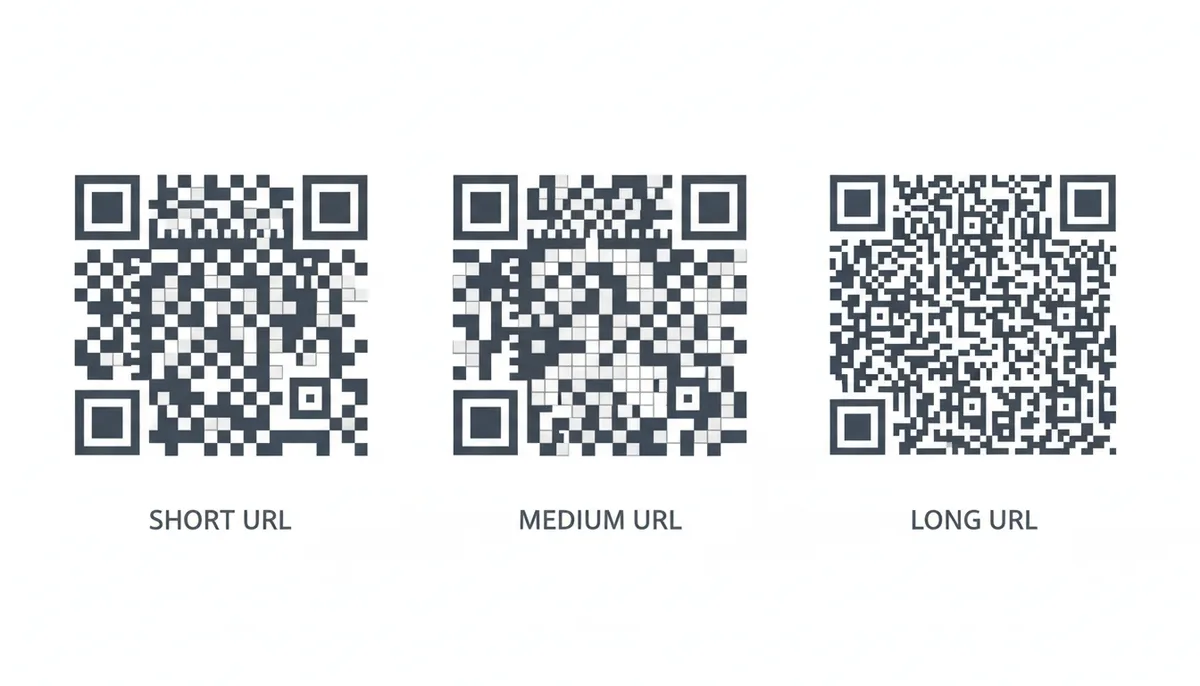
QR codes look like two-dimensional barcodes, but they behave like carefully balanced budgets. Every character you encode spends a portion of the grid's capacity, and the grid can only expand in discrete jumps. The ISO/IEC 18004 specification defines forty possible sizes, starting at a 21-by-21 module grid and expanding in four-module increments. A short link might settle comfortably into a small grid, while a lengthy tracking URL forces the pattern into a denser version where each individual square is smaller and harder for a phone camera to resolve.
URLs are encoded in byte mode, which stores each character as eight bits. That's less efficient than numeric or alphanumeric modes, but URLs demand it because they contain symbols — slashes, question marks, equals signs, ampersands — that fall outside the simpler alphabets. Some advanced generators attempt mixed-mode encoding to squeeze a few extra characters out, shifting into alphanumeric mode for the domain name and back into byte mode for the query string, but the gains are modest and the added complexity can introduce compatibility issues with older scanners. For practical purposes, assume every character in your URL costs one byte of capacity.
After the raw data comes the error correction. The standard offers four levels: L permits roughly 7% damage, M about 15%, Q about 25%, and H about 30%. Those redundant modules don't store your URL; they store mathematical recovery data that lets a scanner reconstruct the message if part of the code is smudged, creased, or covered by a logo. Choosing level H means nearly a third of your pattern is devoted to resilience. That's excellent for reliability, but it increases the grid size, which shrinks every module at a given print dimension. The result is a direct trade-off: the more you protect the code, the more you stress the camera trying to read it.
Here is how this plays out in practice. Say you have two links. The first is a dynamic short URL from your provider: twenty characters. The second is a full campaign URL loaded with UTM parameters, pushing well past a hundred characters. Encode both as static codes at error correction level H and print them at one inch square. The short link might render in a 25-by-25 or 29-by-29 grid — coarse, forgiving squares that a phone can pick up from a foot away in dim light. The long link could jump to a 33-by-33 or larger grid, packing the same print area with far smaller modules. At that density, an older Android phone or a scratched lens may need the code held closer and steadier, and the quiet zone — the mandatory blank margin — becomes physically narrower in millimeters even though it's still four modules wide. A busy designer who crops that margin to fit a tight layout has just made an already-difficult code impossible.
The decision rule is straightforward. If you're using a static QR code, pass the URL through a branded shortener first so the encoded payload stays small. If you're using a dynamic QR code, the encoded payload is the provider's short redirect URL regardless of your final destination length, which is one of the least discussed reasons dynamic codes scan more reliably in the real world. They aren't just editable; they're physically simpler patterns. I use dynamic codes for any URL longer than a simple domain name, and I keep error correction at H unless I'm displaying the code on a pristine screen where damage is impossible. The cost is a slightly larger minimum print size; the benefit is a code that still works after a splash of coffee or a crease through the middle.
A Complete Build: Designing a QR Code for a Product Launch
Suppose you run a small coffee roastery and you're about to bag ten thousand units of a limited spring roast. You want a QR code on the label that sends drinkers to brewing instructions and a subscription discount. The bags go to the printer on Wednesday. The coffee doesn't launch for two weeks. This is where theory meets paper stock.
Start with the destination. Your first draft URL is https://www.fernwoodcoffee.com/products/limited-spring-roast?utm_source=bag-label&utm_medium=qr-code&utm_campaign=spring-launch. That's long. Paste it into a static generator and you'll see a busy pattern. More importantly, the product page doesn't exist yet. The roaster is still cupping lots. If you print a static code now, you must choose between linking to a dead page or delaying the print run until the site is live. Neither is acceptable.
So you build a dynamic QR code. In the generator, you select URL type and paste your placeholder — today it points to a simple /coming-soon page with an email capture form. The pattern encodes only the provider's short redirect link, which keeps the grid simple. You name the code Spring-Bag-2024 in the dashboard so you can find it among fifty others in six months. You set the error correction to H because you know kraft paper labels scuff in shipping. You download the file as SVG because the label designer works in Illustrator and will scale the code to exactly 1.25 inches wide.
Customization comes next. Your rooster logo goes in the center, but you keep it small — roughly one-fifth of the code width — and you place it dead center, avoiding the three corner finder squares. The background is cream and the code is dark brown. Contrast is lower than pure black and white, so you test aggressively rather than assuming. You reject the designer's first proof because the logo creeps into the quiet zone. You add the required blank margin back in.
Testing happens on real material, not on screen. You have the printer produce one physical label on actual kraft stock, adhere it to a bag, and let it sit overnight so the adhesive cures and any slight bubbling appears. You scan it with three devices: a recent iPhone using the native camera, a three-year-old Samsung running a dedicated QR app, and a budget Android phone. You test under the warm fluorescent tubes of your retail partner's shelf, in direct afternoon sun, and in shade. You also test from a slight angle, because shoppers won't hold the bag perfectly perpendicular. Only after all nine combinations — three devices, three lighting conditions — read the code instantly do you approve the proof.
Launch morning, you open the dashboard and change the redirect from /coming-soon to the live product page. The bags already in stores update instantly. Two weeks later, you switch the same code to the subscription landing page because the initial stock has sold through. The analytics show you which zip codes scanned most, what time of day the codes were hit, and what percentage of scanners were on iOS versus Android — data you use to decide where to place the next batch.
The trade-off you accepted: a monthly plan for dynamic codes instead of a free static generator. The trade-off you avoided: ten thousand labels that commemorate a URL you couldn't change, a product delay, or a reprint that costs more than two years of the service.
When the QR Code Scans Fine But the Journey Still Fails
A perfect QR code pattern guarantees only one thing: the phone receives the exact string you encoded. Everything that happens after that — resolving the domain, following redirects, loading the page, firing tracking scripts — is outside the code's control. Most failures I've seen weren't scanning failures; they were post-scan infrastructure failures that the creator discovered only after complaints trickled in.
Start with redirect chains. A dynamic QR code usually creates one clean hop: the provider's short URL issues an HTTP redirect to your destination. That's ideal. But if you layer your own shortener on top, or if your web server forwards http to https, or prepends www, or routes through a geo-targeting service, you've built a chain. Each hop adds latency, and on a mobile connection in a weak-signal area, extra hops can mean the difference between a loaded page and an abandoned load. Worse, if any intermediate step still uses unencrypted HTTP, some browsers strip referrer data. I've seen campaigns where the QR code worked, the page rendered, and Google Analytics showed direct traffic instead of the expected UTM source because an early redirect dropped the query parameters. The rule is simple: from QR code to final page, aim for a single redirect, and never let an unencrypted hop sit in the middle.
SSL certificate expiry is a silent killer for long-lived codes. A QR code printed on a product package or embedded in a textbook can circulate for years. The code itself doesn't age, but SSL certificates do. When a scanner hits an expired certificate, the browser throws a full-screen security warning that the vast majority of users won't bypass. The code performed flawlessly; the destination simply became untrustworthy overnight. If you print QR codes that will live longer than your certificate renewal cycle, set calendar alerts at sixty and thirty days before expiry. For critical campaigns, consider pinning or monitoring the specific URL with an uptime checker.
Deep linking introduces another class of failure. You might encode a URL scheme like myapp://product/123 hoping to open a specific screen inside your native app. That scheme resolves to nothing unless you've implemented a universal link or a smart fallback page. Without that fallback, the user stares at an error or a blank screen. Unless you have a developer actively testing both the "app installed" and "app not installed" paths, avoid custom schemes in public-facing QR codes. Use a standard HTTPS URL that detects the app server-side or presents a perfectly usable web experience for everyone else.
Content blockers and privacy tools can also distort your results. iCloud Private Relay, VPNs, and aggressive ad blockers may refuse to load the redirect domain of a budget QR provider, or they may strip tracking parameters before the hit reaches your analytics. You'll see fewer scans in the dashboard than actually occurred, or your UTM-tagged destination will see the visit but not the source. Mitigate this by using a first-party subdomain for short links if your provider allows it. A link like go.yourdomain.com/x1y2 survives blocklists far better than qr-short.xyz/x1y2.
Finally, consider the lifetime of the destination itself. A QR code on a billboard, a museum plaque, or a piece of industrial equipment can outlast the marketing campaign, the CMS migration, or even the company. I treat any code destined for physical infrastructure as a permanent URL that I intend to maintain forever. That means a domain I control, a hosting setup I monitor, and a quarterly check that the link still lands where it should. Because once the code is in the world, the easy part is over.
Sources
- ISO (International Organization for Standardization) — The technical specifications of QR codes, including structure, versions, and error correction levels, are defined by the ISO/IEC 18004 standard.
- Denso Wave Incorporated — Information on the origin, invention, and basic principles of QR codes, as Denso Wave is the original inventor.
- W3C (World Wide Web Consortium) — The formal definition and syntax of a Uniform Resource Locator (URL), backing the claims about its structure (protocol, domain, path, etc.).
- Apple Developer Documentation — Technical details on Universal Links, the technology behind deep linking on iOS devices.
- Android Developers — Technical details on Android App Links, the technology behind deep linking on Android devices.