Why Does Choosing the 'Right' QR Code Type Matter?
You scan a QR code on a restaurant table expecting a menu, but your phone tries to save a contact instead. Or worse, you print 5,000 business cards with a QR code linking to your website, then realize you misspelled the URL—and now you're stuck with boxes of expensive coasters.
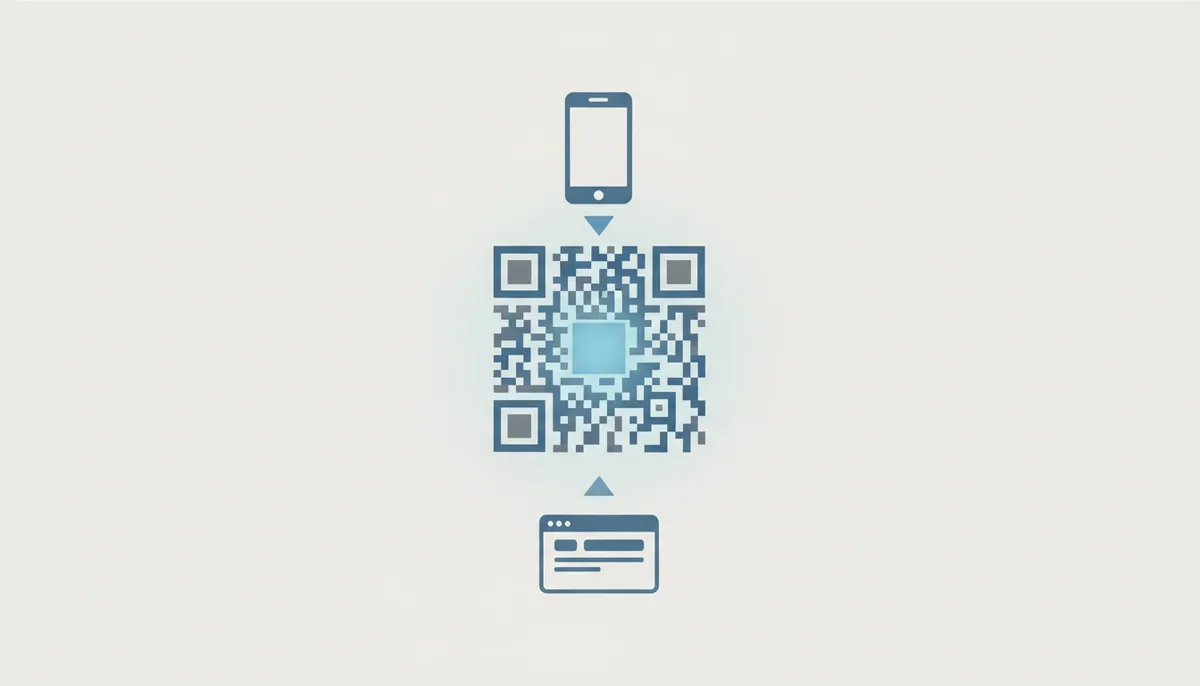
Here's what most people miss: a QR code isn't just a fancy barcode. It's a container for structured data that instructs the scanning device to perform a specific action. Choose URL, and phones open a browser. Choose vCard, and they save a contact. Choose Wi-Fi, and they connect to your network. The pattern you see encodes not just information, but instructions.
Before you even think about colors or logos, you face the most fundamental choice in QR code creation: Static or Dynamic. This single decision determines whether you can track scans, update content, fix mistakes, and gather analytics—or whether what you create today is carved in stone forever.
Static codes are permanent and direct. The destination URL, contact information, or Wi-Fi password is encoded directly into the black and white pattern. Once generated and printed, that data cannot change. Think of it as writing in permanent ink.
Dynamic codes are flexible and trackable. They encode a short redirect URL that points to your actual content. You can change where that redirect points anytime, track every scan with analytics, and even set expiration dates. But they depend on a service staying online—if your QR provider disappears, so does your code's functionality.
The Critical First Decision: Static vs. Dynamic QR Codes
Static QR codes work like a direct phone number. When someone scans a static code containing "tel:555-0123", their phone immediately prompts to call that number. The instruction is baked into the pattern itself. No internet required, no middleman, no tracking. If you printed this code on stone and buried it for a thousand years, future archaeologists with QR scanners could still call that number (assuming it still existed).
The data in a static code becomes part of the physical pattern. A URL like "https://example.com/products/special-offer-2024" creates a specific arrangement of black and white squares. Want to change it to "special-offer-2025" next year? You'll need to generate an entirely new code and reprint everything.
Dynamic QR codes work like a forwarding address. Instead of encoding "https://yourwebsite.com/summer-campaign", the code contains something like "https://qr.link/abc123". When scanned, the user's phone first visits this redirect URL, which then forwards them to your actual destination. You control where that redirect points through your QR code provider's dashboard.
This architecture enables powerful features. Change your campaign URL without reprinting materials. Track scan metrics: time, location, device type, unique vs. repeat visitors. Set codes to expire after an event ends. Display different content based on the scanner's language or location. But it also introduces dependency—if your QR service has an outage or you forget to renew your subscription, every dynamic code you've created stops working.
The choice becomes clear when you consider permanence versus flexibility. Use static codes for:
- Wi-Fi passwords in an Airbnb (guests need instant connection)
- Equipment serial numbers or asset tags
- Museum exhibit information that won't change
- Emergency contact information
- ISBN numbers on books
Use dynamic codes for:
- Marketing campaigns where you need scan analytics
- Restaurant menus that change seasonally
- Business cards (you might change jobs or phone numbers)
- Event tickets that should expire after the event
- Real estate signs linking to property listings
- Product packaging linking to support content
| Feature | Static QR Code | Dynamic QR Code |
|---|---|---|
| Editability | Fixed forever once created | Editable anytime via dashboard |
| Analytics | No tracking possible | Detailed: scans, location, time, device |
| Scannability | Can become dense with lots of data | Always simple pattern (just redirect URL) |
| Lifespan | Works forever, no maintenance | Requires active subscription |
| Internet Required | No (except URL types) | Yes, always needs connection |
| Use Cases | Wi-Fi, permanent info, offline access | Marketing, menus, anything that changes |
Anatomy of a QR Code: What Affects Your Choice
Every QR code contains the same basic components, regardless of type. Three square finder patterns anchor the corners, helping scanners orient the code even if it's tilted or partially obscured. A quiet zone of white space surrounds the entire pattern—without this buffer, scanners struggle to identify where the code begins. The data itself fills the remaining space as a matrix of black and white modules.
As you add more data to a QR code, it grows in complexity. QR codes have 40 different "versions," from Version 1 (21×21 modules) to Version 40 (177×177 modules). A simple URL might fit in Version 2 or 3. A complete vCard with name, company, address, three phone numbers, and a photo? You're looking at Version 10 or higher.
This matters because complexity affects scannability. A Version 3 code prints clearly on a business card and scans from across a conference table. A Version 10 code needs more precise printing and closer scanning distance. Restaurant menus learned this the hard way—early adopters crammed full menus into static QR codes, creating dense patterns that wouldn't scan under dim restaurant lighting.
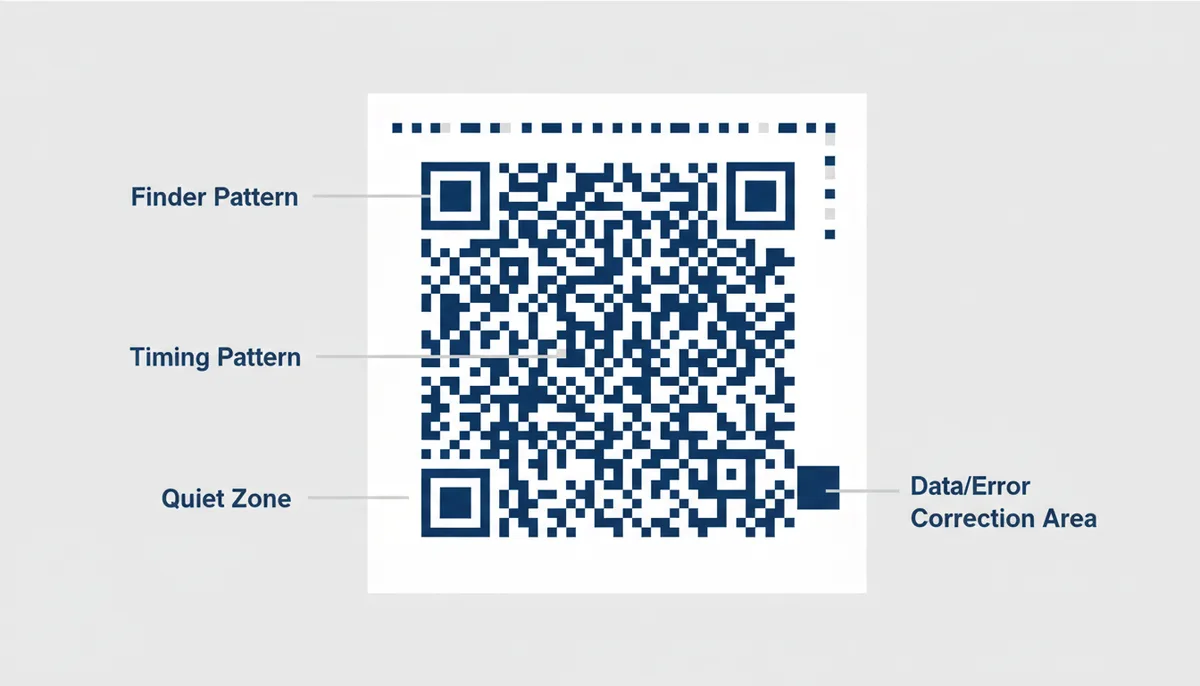
Error correction adds another layer to this decision. QR codes can recover from damage through redundant data, rated L (7% recovery), M (15%), Q (25%), or H (30%). Higher error correction means the code remains scannable even with scratches, dirt, or a logo covering part of the pattern. But it also increases the code's size for the same amount of data.
Choose L for clean environments like printed documents. Choose M for general use like business cards or posters. Choose Q or H when adding logos or expecting wear—outdoor signs, vehicle decals, or anywhere the code might get dirty or damaged. A restaurant using QR codes on outdoor tables should use H-level correction. Those codes will face rain, spilled drinks, and sticky fingers.
Category 1: Connecting People to Online Content
URL codes dominate QR usage for good reason—they're simple, universal, and every phone knows what to do with them. Scan a URL code, and the default browser opens to that address. No special apps, no compatibility issues. But the simplicity hides important decisions about how you structure these links.
A direct URL like "https://restaurantname.com/menu" works, but it's a black box. You have no idea who scanned it, when, or where. Add UTM parameters, and suddenly you're tracking campaign performance: "https://restaurantname.com/menu?utm_source=table-tent&utm_medium=qr&utm_campaign=summer-2024". Now your analytics show exactly which table tents drive the most menu views.
Dynamic URL codes unlock even more tracking without cluttering the link. The QR service captures device type, scan time, rough location, and repeat vs. new scanners. You can A/B test different landing pages, redirect based on language settings, or schedule different content for lunch vs. dinner crowds. Consider how a restaurant might discover patterns in their scan data—perhaps Wednesday evenings show unusual activity from a specific location. They could create targeted content like special group menus that appear only during those peak times.
Social media QR codes solve a specific problem: people use different platforms. Instead of choosing Instagram or LinkedIn, these codes lead to a landing page displaying all your social profiles. Users choose their preferred network. More importantly, you can update the landing page as platforms rise and fall. Remember when every business needed a Google+ link? Dynamic social media codes let you add TikTok today and whatever replaces it tomorrow.
App store codes demonstrate intelligent routing at work. One QR code detects whether the scanner uses iOS or Android, then redirects to the appropriate app store. No more printing two codes or sending iPhone users to Google Play. This same intelligence can route desktop scanners to a web app while mobile users get the native app prompt.
Category 2: Sharing Contact and Network Information
The vCard format supports comprehensive contact information—multiple phone numbers, addresses, email accounts, company names, job titles, even profile photos. Modern phones recognize vCard data and automatically open the "Add Contact" screen with everything pre-populated.
meCard offers a lighter alternative. Developed in Japan by DoCoMo, it carries the basics: name, phone, email, address. The simpler format creates smaller QR codes that scan more reliably. If you're just sharing a name and number, meCard keeps your code clean and scannable from greater distances.
The vCard vs. meCard choice often comes down to completeness versus simplicity. A CEO's business card might use vCard to include their full title, company address, assistant's contact, and LinkedIn profile. A freelance photographer might choose meCard with just name, phone, and portfolio URL. Test both—generate your full contact information in each format and see which creates a more scannable code.
Wi-Fi QR codes have transformed guest network access. Instead of spelling out "MyNetw0rk!" and repeating "zero, not the letter O," guests scan and connect instantly. The code embeds the network name (SSID), password, and security type (WPA/WPA2/WPA3). iPhones added native support in iOS 11, Android devices have supported it even longer.
The format is deceptively simple: WIFI:T:WPA;S:NetworkName;P:Password123;H:false;; But small details matter. Hidden networks require H:true. Some older devices struggle with special characters in passwords. Test your Wi-Fi code with various devices before laminating it for the guest bedroom.
Email, Phone, and SMS codes trigger specific communication actions. Email codes can pre-fill recipient, subject, and body text—perfect for "Contact Support" codes that include order numbers or "Send Feedback" codes with survey prompts. Phone codes immediately prompt to call, while SMS codes open the messaging app with pre-written text. A repair shop uses SMS codes on equipment: customers scan to text their ticket number and receive status updates.
A Step-by-Step Framework for Choosing Your QR Code
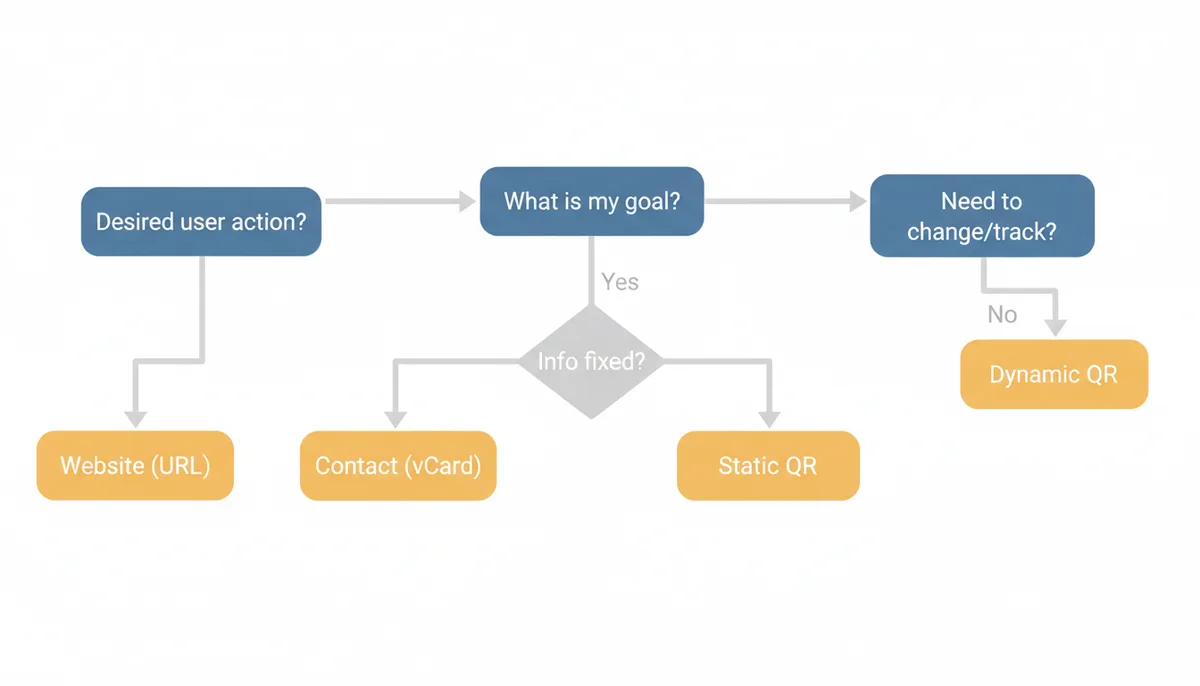
Start with the end user's experience. What happens immediately after they scan? This single question eliminates most wrong choices. If they should see a website, you need a URL code. If they should save a contact, you need vCard. If they should connect to Wi-Fi, you need a Wi-Fi code. The action determines the type.
Question 1: "Will I EVER need to change the destination or track scans?"
This is your static vs. dynamic decision. Be honest about future needs. That "permanent" menu might change when suppliers raise prices. The "unchanging" business card becomes obsolete when you get promoted. If you answer "maybe" to either change or tracking, choose dynamic. The small ongoing cost beats reprinting thousands of materials.
Question 2: "What is the single most important action I want the user to take?"
QR codes work best with one clear purpose. A code that tries to share your contact info AND link to your website AND connect to Wi-Fi accomplishes nothing well. Pick the primary action:
- Open a website → URL Type
- Save my contact → vCard Type
- Connect to our Wi-Fi → Wi-Fi Type
- Add our event to calendar → Event Type
- Find our location → Location Type
- Download our brochure → PDF Type
Question 3: "Where and how will people scan this code?"
Context drives technical choices. A billboard needs a simple URL code with high error correction—drivers have seconds to scan from a distance. A conference badge can use a detailed vCard because people scan up close in good lighting. Table tent codes in restaurants need H-level error correction for spills and wear.
Question 4: "What constraints does my medium impose?"
Business cards limit code size to about one square inch. Billboards need massive codes visible from moving vehicles. Product packaging might require codes that survive freezing, moisture, or rough handling. Each medium has its sweet spot—respect these limits or watch your scan rates plummet.
Category 3: Specialized & Niche QR Code Types
Event codes create calendar entries with one scan. They encode the .ics (iCalendar) format that every major calendar app understands—Google Calendar, Apple Calendar, Outlook, you name it. Include event title, start and end times, location, description, even reminder settings. Wedding planners love these: guests scan the invitation's code and the ceremony appears in their calendar with directions to the venue.
The technical format looks complex but follows a pattern:
BEGIN:VCALENDAR
BEGIN:VEVENT
SUMMARY:Annual Company Picnic
DTSTART:20240615T120000Z
DTEND:20240615T170000Z
LOCATION:Riverside Park, Shelter 3
DESCRIPTION:Join us for food, games, and team building!
END:VEVENT
END:VCALENDAR
But don't hand-code these. Use a proper event QR generator that handles time zones, recurring events, and calendar compatibility. One nonprofit learned this after their hand-coded event QR put their gala at 3 AM due to timezone confusion.
Location codes embed GPS coordinates that open in the scanner's default map app. Format: "geo:40.7128,-74.0060" launches maps centered on those coordinates. Add a zoom level with "geo:40.7128,-74.0060?z=15". Some generators let you include a place name, though not all map apps display it.
These codes shine for locations that mapping services struggle with—festival grounds, hiking trailheads, pop-up markets, construction sites. A food truck rotates between five locations; each has a QR code sticker on nearby poles. Customers scan to navigate directly to today's spot without searching "Thai food truck near me" and finding last week's location.
Payment codes are evolving rapidly. Bitcoin and Ethereum addresses encode directly—scan to open your wallet app with the recipient address pre-filled. Some codes include the payment amount. Lightning Network invoices work similarly for instant Bitcoin payments. Traditional payment services like PayPal and Venmo also support QR payments, though these typically use dynamic URL codes to their payment pages.
Cryptocurrency addresses particularly benefit from QR encoding. Nobody wants to type "bc1qxy2kgdygjrsqtzq2n0yrf2493p83kkfjhx0wlh" by hand. One character wrong sends funds to the void. QR codes eliminate transcription errors for these unforgiving systems.
PDF codes highlight an important distinction: embedding versus linking. You cannot encode an entire PDF in a QR code—the data limit prevents it. Instead, these codes link to hosted PDFs. Static codes point to a permanent URL where your PDF lives. Dynamic codes let you update which PDF appears without changing the code. Real estate agents use dynamic PDF codes on signs; they update the linked brochure as properties sell without replacing the sign.
Common Mistakes When Choosing a QR Type (and How to Avoid Them)
Using a static URL for a marketing campaign ranks as the most expensive mistake in QR codes. You print 10,000 flyers for your summer sale linking to "yourstore.com/summer2024". The campaign succeeds, driving significant traffic. But you have no scan data—no idea which locations performed best, what times people engaged, or whether repeat customers emerged. Worse, when summer ends, that URL either needs maintaining forever or will break, frustrating future scanners.
The fix is straightforward: always use dynamic QR codes for marketing. The monthly cost of a QR service pales compared to printing costs. You'll track every scan, test different landing pages, and seamlessly transition to fall campaigns. One retailer discovered their bus stop ads drove 3x more scans than their subway placements—data they'd never have with static codes.
Overloading static codes creates unscannable monsters. A business owner wants their QR code to include their full vCard details: name, title, company, address, three phone numbers, email, website, LinkedIn, Twitter, and a base64-encoded profile photo. The resulting code looks like television static—dense, complex, and impossible to scan from more than six inches away.
Instead, prioritize essential information or switch to dynamic. A dynamic vCard code maintains a simple pattern while linking to a full contact page. Users get all your details; you get a code that actually scans. If you must use static, strip to essentials: name, mobile, email, website. Save the full corporate directory for your email signature.
Using plain text when structured types exist wastes the QR format's power. Someone encodes "Call us at 555-0123" as plain text. Scanners display this text, requiring users to read the number, switch apps, and dial manually. A proper phone code (tel:555-0123) triggers the dialer immediately—one tap to call.
| Common Mistake | Why It's a Problem | The Better Choice |
|---|---|---|
| Using Static for Marketing | No analytics, can't update destination, broken links after campaign | Dynamic QR with tracking and editable destination |
| Overloading a Static Code | Dense pattern won't scan from normal distances, high failure rate | Dynamic code linking to full information page |
| Using Text for a vCard | Forces manual copying instead of one-tap contact saving | Proper vCard format for automatic contact import |
| Poor Color Contrast | Scanners can't distinguish modules, code fails completely | High contrast: black on white or dark on light |
| Forgetting the Quiet Zone | Scanners can't identify code boundaries, inconsistent scanning | Maintain clear border equal to 4 modules width |
| Wrong Error Correction | Clean codes waste space, dirty codes won't scan | Match correction level to usage environment |
Poor color choices kill QR codes faster than any other design decision. That gorgeous navy blue on light gray might match your brand guidelines, but phone cameras see inadequate contrast. QR scanning requires clear distinction between dark and light modules. Black on white works best. Dark colors on light backgrounds generally succeed. Light on dark can work if the contrast is extreme.
Test every design choice with real phones in realistic conditions. Your designer's high-end phone under studio lighting doesn't represent your customer's three-year-old device in a dimly lit restaurant. When in doubt, maximize contrast and increase error correction.
The Real Cost of Getting QR Codes Wrong: Case Studies from the Field
A major hotel chain learned about QR code permanence the expensive way. They embedded static Wi-Fi codes in 5,000 room key cards, proudly advertising "instant connection" to guests. Six months later, a security audit mandated a password change. The IT department updated the network credentials, instantly breaking every QR code in circulation. Guests scanned codes that promised Wi-Fi but delivered only error messages. The replacement? $40,000 in new key cards plus rushed shipping.
The fix would have cost $20 monthly. A dynamic QR code pointing to a simple landing page could display current network credentials, update instantly with password changes, and even show different networks for different room types. Instead, they now maintain the old password on a segregated "QR network" with bandwidth throttling—a permanent technical debt from one static code decision.
A restaurant group discovered density limits through customer complaints. Their original QR menus packed entire multi-page PDFs into static codes—appetizers through desserts, wine lists, daily specials. The resulting Version 27 codes looked like Rorschach tests. Under dim mood lighting, even high-end phones struggled. Scan attempts averaged four tries; many customers gave up and requested physical menus.
Their second attempt went too far the other direction. Separate QR codes for food, drinks, desserts, and specials cluttered tables with a confusing array of codes. Customers didn't know where to start. Servers spent more time explaining QR codes than taking orders. The solution? One dynamic code leading to a clean mobile menu with navigation. Scan rates jumped 400%, and they could update specials without reprinting.
Error correction levels revealed their importance during COVID when a brewery started using QR codes on picnic tables. They chose L-level correction to keep codes small and clean. Within weeks, outdoor exposure—rain, sun, spilled beer—degraded codes below scanning threshold. Tables near the cornhole boards failed first, pelted with dust and impacts. M-level codes on replacement stickers lasted two months. H-level codes survived the entire season, scanning reliably despite looking like they'd been through a blender.
A conference organizer's vCard disaster shows why testing matters. They generated speaker badges with comprehensive vCard codes: name, title, company, bio, headshot, social links. The Version 35 monstrosities required perfect alignment and proximity to scan. Attendees formed awkward scanning conga lines, holding phones inches from badges. Worse, iOS and Android handled the oversized vCards differently—Android truncated data while iOS sometimes crashed the contacts app.
Post-conference analysis revealed the killer: base64-encoded profile photos inflated the vCards from 500 to 5,000 characters. Removing photos dropped them to Version 10—scannable from arm's length. Next year, they used dynamic codes linking to speaker profile pages. One simple pattern, full information online, plus analytics showing which speakers generated the most interest.
These failures share common themes: optimizing for the wrong metric (completeness over scannability), ignoring environmental factors (lighting, weather, wear), and misunderstanding user behavior (nobody wants to scan four codes for one menu). Success comes from starting with the scanning experience and working backward to the technical implementation.
Sources
- ISO/IEC — The official standard for QR Code technology, ISO/IEC 18004, which defines its structure and data encoding rules.
- Denso Wave Incorporated — Claims about the origin and invention of the QR code, as Denso Wave is the original inventor.
- Google ZXing ('Zebra Crossing') Project — Technical specifications for data formats like Wi-Fi network configuration (`WIFI:T:WPA;S:mynetwork;P:mypass;;`) and contact cards (`MECARD:`), as ZXing is a widely used open-source library for processing them.
- Internet Engineering Task Force (IETF) — The technical specification for the vCard format (RFC 6350), which defines the fields used in vCard QR codes (e.g., N, TEL, EMAIL).