Why Does Choosing the Right QR Code Type Matter?
You scan a QR code at a networking event. Instead of instantly saving the person's contact to your phone, you get a wall of text: "John Smith Marketing Director ABC Corp john@abc.com 555-1234". Now you're stuck copy-pasting each field manually. That's the difference between choosing the right QR code format and the wrong one.
A QR code type isn't some technical abstraction—it's a standardized format that tells the scanning device exactly what to do with the data. When you encode contact information as a vCard, phones recognize it and offer to save the contact with one tap. When you encode WiFi credentials in the proper format, devices connect automatically without typing passwords. The format you choose shapes the entire user experience.
Most people don't realize that a QR code is just a visual representation of text. The "type" determines how that text is structured. A URL type contains "https://example.com". An SMS type contains "sms:5551234?body=Hello". A WiFi type contains "WIFI:T:WPA;S:NetworkName;P:password;;". Your phone's camera reads this text and interprets the format to take the appropriate action.
Before diving into specific types, you face a fundamental choice that affects everything else: Should your QR code store the actual data (static) or point to data stored online (dynamic)? A static code embeds your information directly into the pattern—once printed, it's permanent. A dynamic code contains a short URL that redirects to your actual content, which you can change anytime. This decision impacts whether you can edit the code later, track who scans it, and how long it remains functional.
Static vs. Dynamic: Which Foundation Do You Need?
A Static QR Code works like etching information in stone. The data—whether it's a URL, contact card, or WiFi password—becomes part of the visual pattern itself. Once you generate the code, that information is permanent. Print it on 10,000 business cards, and all 10,000 will forever contain the exact same data.
A Dynamic QR Code takes a different approach. Instead of encoding your actual content, it stores a short redirect URL like "qr.io/abc123". When someone scans it, their phone visits this URL, which then forwards them to your real destination. The magic happens because you control that redirect—you can change where it points without touching the QR code itself.
This distinction shapes everything about how you'll use the code. Static codes are simple and eternal: they work offline, never expire, and require no ongoing service. But they're inflexible. Found a typo in your contact info? Need to update your restaurant's menu URL? With static codes, you're reprinting everything.
Dynamic codes solve the editing problem but introduce dependencies. They require an active redirect service (usually subscription-based), won't work if that service goes down, and need internet connectivity to function. Yet for many business uses, these trade-offs are worth it for the ability to update destinations and track engagement.
| Feature | Static QR Code | Dynamic QR Code |
|---|---|---|
| Editability | Cannot be changed after creation | Destination can be updated anytime |
| Analytics/Scan Tracking | No tracking possible | Tracks scans, location, device type, time |
| Lifespan | Works forever | Works while redirect service is active |
| Required Subscription | No (one-time creation) | Yes (for redirect service) |
| Best For | Permanent info: WiFi passwords, contact cards, serial numbers | Marketing campaigns, menus, social media, anything that changes |
Once you understand the static versus dynamic choice, you need to match your specific goal to the right QR code format. This decision table shows the best approach for common use cases:
| Goal | Best QR Type | Static or Dynamic? | Sample Format/Destination | Exception Case |
|---|---|---|---|---|
| Open a webpage | URL | Dynamic (usually) | https://example.com/promo | Use static for permanent pages like WiFi instructions |
| Track a campaign | URL with UTM | Dynamic (always) | https://site.com?utm_source=poster | None - tracking requires dynamic |
| Save a contact | vCard | Static (usually) | BEGIN:VCARD... | Use dynamic if contact info changes frequently |
| Join WiFi | WiFi | Static (always) | WIFI:T:WPA;S:MyNetwork;P:pass123;; | None - WiFi credentials are local-only |
| Add calendar event | iCalendar | Static (usually) | BEGIN:VEVENT... | Use dynamic for events that might be rescheduled |
| Share PDF/media | URL to file | Dynamic (always) | https://cdn.example.com/menu.pdf | None - files must be hosted online |
| Start call/text/email | tel:/sms:/mailto: | Static (usually) | tel:+15551234567 | Use dynamic for call centers that route differently |
| Share social profiles | URL to link page | Dynamic (usually) | https://linktr.ee/yourbrand | Use static for single, permanent profile URL |
| Product/package data | Text or URL | Static (usually) | SN:ABC123XYZ or https://verify.com/ABC123 | Use dynamic for recalls or updated instructions |
How Does a QR Code's Structure Affect What It Can Store?
Every QR code follows the same basic blueprint. Those three square corners aren't decoration—they're finder patterns that help scanners orient the code correctly. The smaller squares scattered throughout are alignment patterns, while the alternating black and white lines running between the finder patterns are timing patterns. Together, these elements create a grid where your data lives.
The size of this grid determines how much information you can pack in. QR codes come in 40 versions, starting with Version 1 (21×21 modules) and scaling up to Version 40 (177×177 modules). A module is a single black or white square. More modules mean more data capacity, but also a denser, more complex pattern that can be harder to scan from a distance or when printed small.
Here's where it gets interesting: not all that space holds your data. Part of it goes to error correction—redundant information that lets scanners read damaged or dirty codes. You choose from four Error Correction Levels: L (7% codeword recovery), M (15%), Q (25%), or H (30%). These percentages refer to the error correction algorithm's ability to recover data codewords, not the physical surface area you can damage. Higher correction means your code can recover from more errors in the data stream, but reduces maximum capacity.
This creates a practical trade-off. Encoding a simple URL might produce a Version 3 code (29×29 modules) that's easy to scan even when printed tiny. But encode a complex vCard with multiple phone numbers, email addresses, a full postal address, job title, company name, and a small base64-encoded logo image, and you might hit Version 25 (117×117 modules)—a dense pattern that demands a steady hand and good lighting to scan reliably.
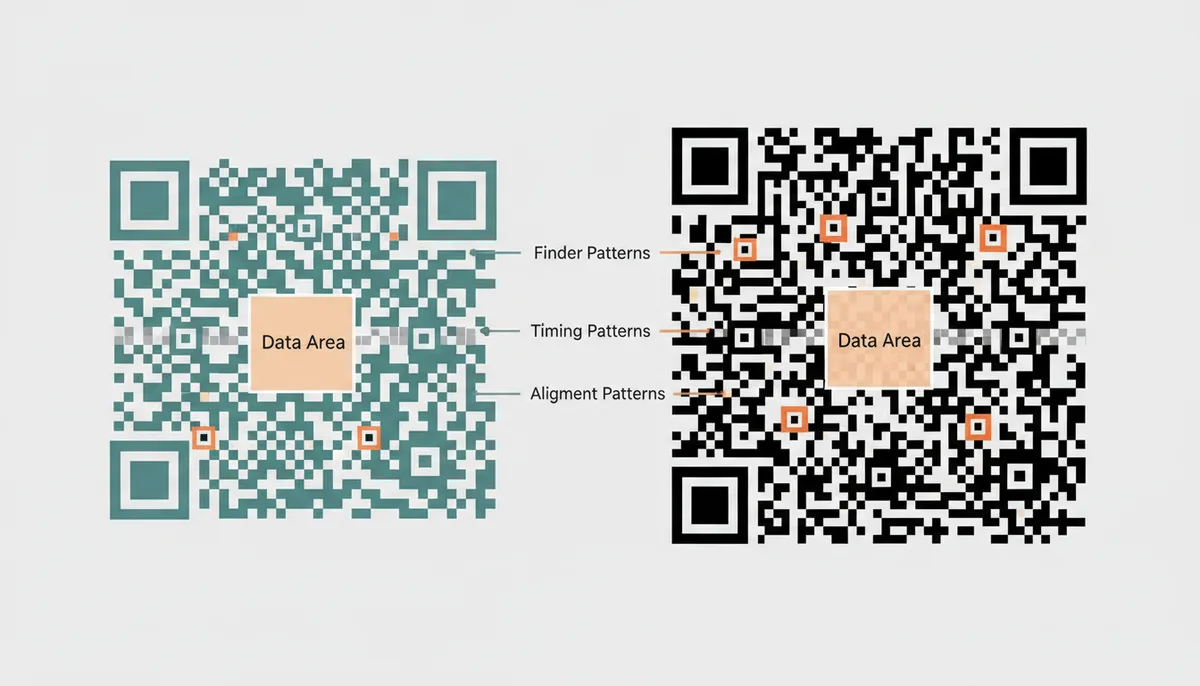
The encoding mode also affects capacity. QR codes optimize for different character types: Numeric mode (0-9 only) packs the tightest, with a theoretical maximum of 7,089 digits in a Version 40 code with Level L error correction, as specified in ISO/IEC 18004. Alphanumeric mode (0-9, A-Z, and a few symbols) tops out at 4,296 characters under the same conditions. Byte mode handles any text but maxes out at 2,953 bytes. There's even a Kanji mode for Japanese characters. The code automatically switches between modes to minimize size. However, these theoretical maximums assume perfect conditions—in practice, codes become difficult to print and scan reliably well before reaching these limits. A Version 10 code (57×57 modules) represents a practical upper bound for most printed applications.
Which QR Code Should I Use for Web Links, Text, and Simple Messages?
URLs dominate QR code usage for good reason. When you encode "https://example.com/menu", any smartphone knows to open a web browser. This simplicity makes URL codes perfect for directing users to landing pages, document downloads, or online content. The real power comes when you add UTM parameters—those tracking codes marketers append to URLs. A code on your trade show banner might encode "https://example.com/promo?utm_source=tradeshow&utm_campaign=spring2024", letting you track exactly which physical touchpoints drive traffic.
Plain text codes serve a different purpose entirely. They display raw information without triggering any specific app. Encode a serial number, and users see just that number. No browser opens, no app launches—the text appears on screen for users to read or copy. This works well for product identifiers, WiFi passwords displayed as backup (when not using the proper WiFi format), or short informational messages. But remember the capacity limits: even with the most efficient encoding, you're looking at roughly 3,000 characters maximum, and dense codes get harder to scan.
Email codes leverage the mailto: URI scheme that's been around since the early web. Encoding "mailto:support@example.com?subject=Product%20Inquiry&body=I'm%20interested%20in..." creates a code that opens the user's default email app with the recipient, subject, and even body text pre-filled. Users just hit send. The catch? You're limited by URL length restrictions, so keep the pre-filled content brief.
SMS codes work similarly using the sms: scheme. "sms:15551234567?body=DISCOUNT" opens the messaging app with the number and text ready to go. This beats asking users to text a keyword to a short code—one scan replaces multiple steps. Phone codes are even simpler: "tel:+15551234567" triggers the dialer. No more transcription errors or forgotten digits.
Each of these formats solves a specific friction point. URL codes eliminate typing long web addresses. Email and SMS codes remove the barrier of composing messages from scratch. Phone codes prevent misdialed numbers. The key is matching the format to your user's next action. Want them to visit your website? Use URL. Need them to call for reservations? Use tel:. Want them to text for exclusive deals? SMS is your answer.
What's the Best Way to Share Contact Details for Networking?
The vCard format has become the universal standard for sharing contact information via QR code. When you encode your details as a vCard, smartphones recognize it immediately and offer to create a new contact with all fields properly mapped. Name goes to name, phone to phone, email to email—no manual entry required.
A vCard can hold remarkably rich data. Beyond basics like name and phone number, you can include multiple email addresses, physical addresses, job title, company name, website URL, birthday, and even a small profile photo. The format handles international characters properly and maintains field relationships (marking one number as "work" and another as "mobile"). Here's what a typical vCard looks like in text form:
BEGIN:VCARD
VERSION:3.0
FN:Sarah Chen
ORG:TechCorp Industries
TITLE:Senior Product Manager
TEL;TYPE=WORK:+1-555-123-4567
TEL;TYPE=CELL:+1-555-987-6543
EMAIL:sarah.chen@techcorp.com
URL:https://linkedin.com/in/sarahchen
END:VCARD
MECARD offers a simpler alternative, originally developed by NTT DoCoMo in Japan. It uses a more compact format: "MECARD:N:Chen,Sarah;TEL:5551234567;EMAIL:sarah@email.com;;". This efficiency means smaller QR codes that scan more easily. But MECARD's simplicity comes with limitations—no support for multiple phone numbers, physical addresses, or profile photos. It also lacks vCard's universal recognition, particularly on iOS devices.
| Feature | vCard | MECARD |
|---|---|---|
| Data Fields Supported | Name, multiple phones/emails, addresses, photo, URL, title, company, birthday | Name, one phone, one email, basic address, memo |
| Data Capacity | Higher (more verbose format) | Lower (compact format) |
| Smartphone Compatibility | Universal support on iOS and Android | Better on Android, limited iOS support |
| Best For | Professional networking, complete contact exchange | Simple contact sharing in Japan, minimal data needs |
For business use, vCard wins. Its broad compatibility and rich data support outweigh the slightly larger code size. A properly formatted vCard QR code on your business card transforms a 30-second exchange into a 3-second scan. No more typing errors, no more lost cards, no more "I'll add you later" promises that never happen.
How Can QR Codes Grant Access to Networks or Events?
WiFi QR codes eliminate the most annoying part of guest networks: password entry. Instead of watching visitors hunt-and-peck through "MyC0mpl3x!P@ssw0rd", you generate a code that connects them instantly. The format is surprisingly straightforward: "WIFI:T:WPA;S:YourNetworkName;P:YourPassword;H:false;;" tells the device everything needed for automatic connection.
Breaking this down: T specifies the authentication type (WPA, WPA2, WPA3, WEP, or nopass for open networks). S contains your SSID (network name). P holds the password. H indicates if the network is hidden. When someone scans this code, their device parses these fields and initiates connection without opening any apps or prompting for input. It just works.
This format handles edge cases properly. Network names with special characters? Escape them with backslashes. No password? Use T:nopass and omit the P field. Hidden network? Set H:true. The scanner handles the complexity while users enjoy seamless connectivity. Coffee shops post these codes on table tents. Airbnbs include them in welcome packets. Offices display them in conference rooms.
Calendar events use the iCalendar (.ics) format to create appointments directly from QR codes. While less common than WiFi codes, they're powerful for event promotion. The code contains structured data that defines an event: title, start time, end time, location, description, and reminders. When scanned, the phone offers to add this event to the user's calendar with all details intact.
A minimal calendar event might look like: "BEGIN:VEVENT\nSUMMARY:Product Launch Webinar\nDTSTART:20240315T140000Z\nDTEND:20240315T150000Z\nLOCATION:https://zoom.us/j/123456\nEND:VEVENT". This creates a one-hour event with a Zoom link. More complex versions can include recurring patterns, attendee lists, and multiple reminders.
The challenge with calendar codes is data density. Including a detailed description, location address, and organizer information quickly bloats the code size. For physical event tickets or conference badges, this isn't a problem. But for marketing materials meant to be scanned from a distance, you might need to strip down to essentials: event name, time, and a URL for more details.
How Do I Use QR Codes for Marketing and Rich Media?
Marketing and media applications almost always demand dynamic QR codes. The content changes too frequently and the tracking data is too valuable to use static codes. When you're paying for billboard space or printing 50,000 flyers, you need to know what's working.
PDF and file downloads illustrate why. You can't embed a PDF directly in a QR code—even a small one would require millions of modules. Instead, you encode a URL pointing to the hosted file. "https://example.com/catalog2024.pdf" fits easily in a compact code. With a dynamic code, you can update that catalog without reprinting anything. Track download rates. A/B test different versions. Retire old materials by redirecting to newer content.
App store links showcase dynamic codes' device detection capabilities. A single QR code on your packaging can send iPhone users to the Apple App Store and Android users to Google Play. The redirect service detects the scanning device's operating system and routes accordingly. No more printing separate codes or asking users to choose their platform.
Social media presents a unique challenge: you probably maintain profiles across multiple platforms. Rather than choosing one or cluttering designs with multiple codes, create a mobile-optimized landing page listing all your social profiles. QR Code Machine and similar services offer these "link in bio" pages that present clean grids of social icons. One scan gives users access to your entire social presence.
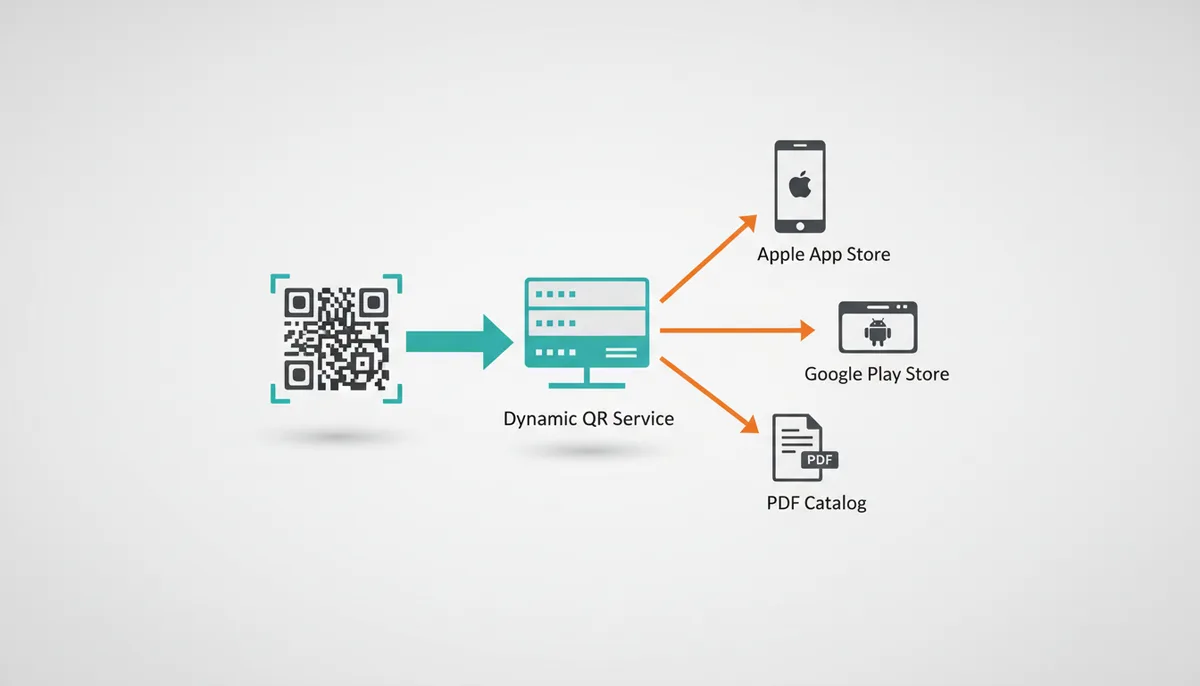
The tracking capabilities transform physical marketing into measurable campaigns. That poster in the subway station? You know it generated 1,247 scans last Tuesday between 5-7 PM. The table tent at your restaurant? 68% of scanners viewed the dessert menu. The business card you handed out at the conference? They scanned it from Seattle three days later.
How Do I Choose the Right QR Code Type? A Step-by-Step Guide
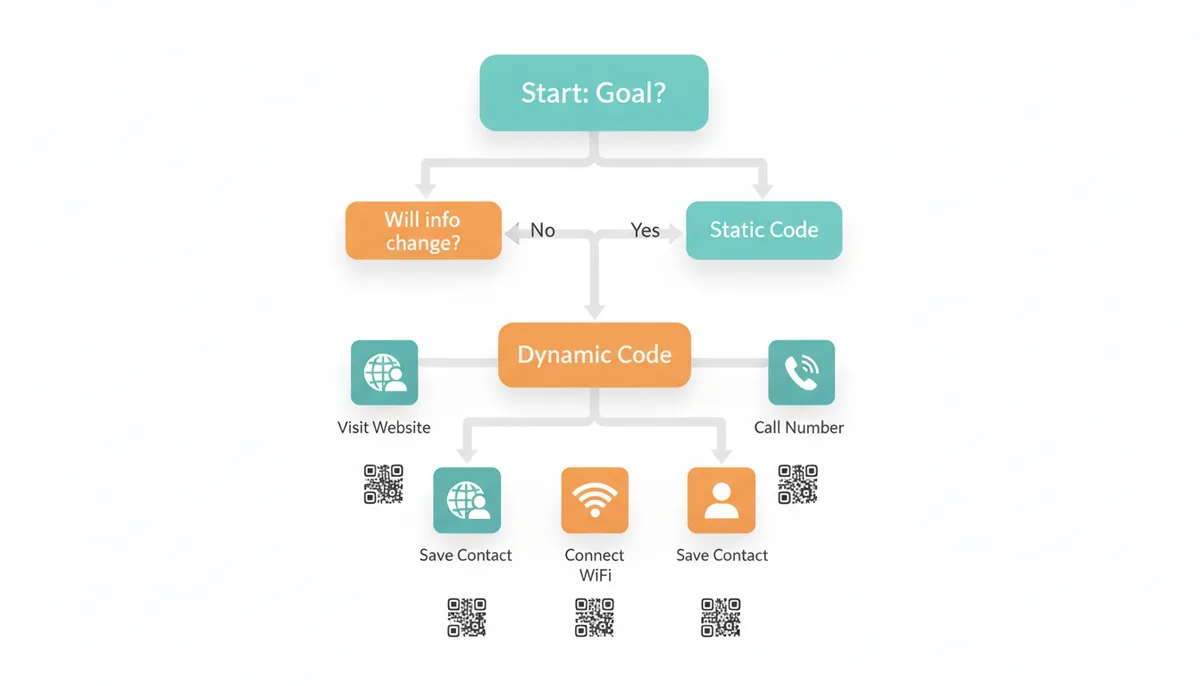
Start with the permanence question: Will this information ever need to change? If you're encoding your home WiFi password, probably not—use a static code. If you're linking to this season's menu or current promotional offers, you need the flexibility of a dynamic code. This single decision eliminates half your options and clarifies the path forward.
Next, identify the specific action you want users to take. Match that action to the appropriate format. "Visit my website" means URL type. "Save my contact info" requires vCard. "Connect to guest WiFi" needs the WiFi format. "Call for reservations" uses tel:. Don't try to be clever here—use the format designed for your purpose.
Consider your printing constraints and scanning environment. A business card has limited space and will be scanned up close—you can use a denser code with more data. A poster viewed from six feet away needs a simpler code with higher error correction. Environmental factors matter too: outdoor signage facing weather needs maximum error correction, while indoor table displays can use lower levels for more data capacity.
Test comprehensively before committing to print. Generate your code and scan it with multiple devices—an iPhone 12, a budget Android phone, the built-in camera apps, and third-party QR scanners. What works perfectly on your phone might fail on others. Pay special attention to vCards, which different apps handle inconsistently. If adding a photo to your vCard makes it unscannable on certain devices, remove it.
For critical applications, consider redundancy. A restaurant might use a dynamic QR code for their main menu (enabling updates and tracking) but also display the WiFi password as static text alongside its QR code. A conference badge might encode the attendee's vCard while printing key details in human-readable format. Give users options when the stakes are high.
Frequently Asked Questions
Can I edit a QR code after it has been printed?
Only if it's a dynamic QR code. The pattern itself encodes a short URL that never changes, but you control where that URL redirects. Want to update your restaurant's menu? Change the destination in your QR code management dashboard—every existing code instantly points to the new content. Static QR codes encode the actual data into the pattern, making them permanent and unchangeable.
Do QR codes expire?
Static QR codes last forever because the data is embedded directly in the visual pattern. As long as the pattern remains scannable, the code works. Dynamic QR codes depend on an active redirect service. If you cancel your subscription or the service shuts down, those codes stop working. Some dynamic QR code services also let you set manual expiration dates, useful for limited-time promotions.
How much data can a single QR code hold?
The theoretical maximum is 7,089 numeric digits, 4,296 alphanumeric characters, or 2,953 bytes of binary data. But these assume the lowest error correction and result in extremely dense patterns. In practice, you'll hit usability limits much sooner. A Version 10 code (57×57 modules) is about the densest pattern that scans reliably when printed at business card size. That holds roughly 395 alphanumeric characters with medium error correction.
Can a QR code store a PDF or an image file directly?
No. QR codes store text, not files. To share a PDF, you upload it somewhere online and encode the URL. The user's device downloads the file from that link after scanning. Same goes for images, videos, or any other media. The code is just a pointer, not a container. This is why most media sharing requires dynamic codes—you need somewhere to host the files.
Is it safe to scan any QR code?
QR codes themselves can't harm your device, but they can lead to harmful destinations. Cybercriminals use "quishing" (QR code phishing) to direct victims to fake websites that steal credentials or download malware. Only scan codes from trusted sources. Be especially wary of codes stuck over existing ones, codes in unexpected places, or codes promising prizes or urgent action. Most phones now preview the destination URL before opening it—always check where you're headed.
Does a more complex-looking QR code store more data?
Yes. Denser patterns with more modules indicate more encoded data. A simple URL like "https://example.com" generates a sparse pattern. A complete vCard with photo creates a much denser code. This visual complexity directly impacts scanning reliability—dense codes need steady hands, good lighting, and close range. It's why minimizing data often improves real-world performance more than maximizing capacity.
Why does my vCard QR code not work on some phones?
vCard compatibility varies between devices and scanning apps. Common issues include embedded photos making the code too dense, certain fields not being recognized (like custom labels), or exceeding the scanner's buffer size. iOS and Android also handle some vCard properties differently. Always test on multiple devices and consider stripping non-essential fields if problems arise. When in doubt, stick to core fields: name, phone, email, and organization.
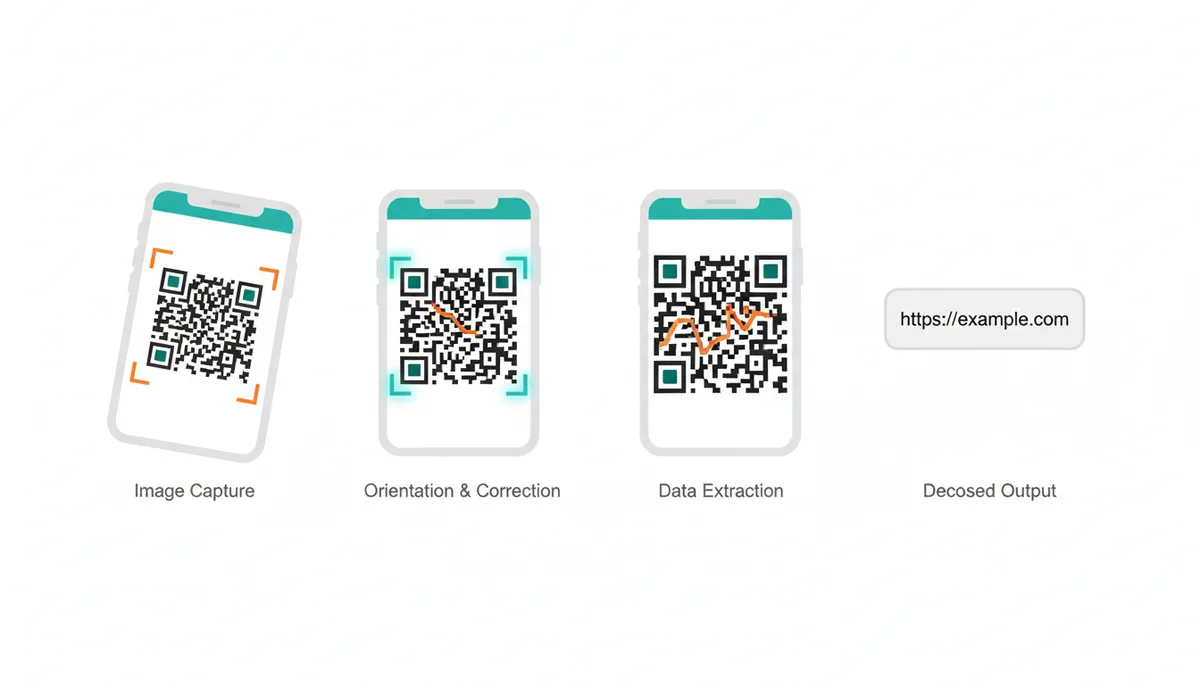
What Actually Happens When Your Phone Scans a QR Code?
Your phone's camera sees a QR code as a grid of light and dark modules, but the magic happens in the image processing. The camera captures frames continuously, and software analyzes each frame for those distinctive square patterns. Modern smartphones process QR codes remarkably fast, making the experience feel instantaneous.
The finder patterns (those three corner squares) serve as anchor points. The scanner uses them to determine the code's orientation and compensate for skewing. You might hold your phone at a 45-degree angle, but the software performs perspective correction to read the image as if viewing straight on. This geometric transformation adjusts for rotation, tilt, and distance.
Once oriented, the scanner maps the timing patterns—those alternating black and white modules running between the finder patterns. These act like a ruler, telling the scanner exactly where each row and column of data modules begins. Without timing patterns, the scanner couldn't distinguish between a 29×29 grid and a 33×33 grid that's slightly farther away.
Reading the actual data starts at the bottom-right corner and follows a specific zigzag pattern. The scanner reads two columns at a time, moving up and down in a snake-like path. This isn't arbitrary—it maximizes error correction by spreading related data across the code. If dirt obscures one area, the redundant information from other areas fills the gap.
The extracted bits go through Reed-Solomon error correction, the same algorithm that lets CDs play despite scratches. Depending on the error correction level, the scanner can reconstruct missing data from 7% to 30% of damaged codewords. This happens mathematically—the error correction codes contain enough redundant information to solve for the missing pieces, like having extra equations in an algebra problem.
After error correction, the scanner identifies the encoding mode from header bits. These tell it whether to interpret the following bits as numbers, letters, or bytes. The scanner then converts the binary data back to text: "https://example.com" or "BEGIN:VCARD" or whatever was originally encoded. Only at this final step does your phone recognize the format and decide what action to take.
The process—from detection to decoded text—happens quickly enough to feel immediate. This efficiency results from optimized algorithms and the computational power of modern smartphones, combined with 25 years of refinement since Denso Wave invented QR codes for tracking automotive parts.
Common QR Code Failures and How to Prevent Them
The most frequent QR code failure happens before anyone tries scanning: choosing insufficient error correction for the use case. A marketing team creates codes with Level L (7%) error correction to minimize size, then watches scanning fail when their glossy brochures create reflective glare. Those same codes might work perfectly on matte paper but fail under the harsh fluorescent lights of a trade show floor.
Size miscalculations plague QR code deployments. A code that scans perfectly on your monitor becomes useless when printed at half an inch on a business card. The general rule: each module (individual square) should be at least 0.33mm wide. For a Version 5 code (37×37 modules), that means a minimum size of 12.2mm square. But this assumes ideal conditions—double or triple that for codes meant to be scanned from more than arm's length.
Color contrast kills more QR codes than any other design choice. Marketers love putting white codes on light backgrounds or using brand colors that look distinct to human eyes but identical to phone cameras. QR scanners typically convert images to grayscale before processing. That trendy navy-on-teal design becomes an unreadable 20% gray on 25% gray. Stick to 70% contrast minimum, measured in grayscale values.
vCard bloat creates a special category of failure. Enthusiastic networkers pack every possible field into their digital business cards: multiple phone numbers, addresses, social media links, company descriptions, even embedded logos. The resulting Version 35+ code looks like static noise. Phones struggle to focus on the dense pattern, and even successful scans might fail when the vCard parser chokes on unexpected data formats or exceeds buffer limits.
Dynamic QR code failures often emerge months after deployment. A restaurant prints beautiful table tents with QR codes linking to their menu. Six months later, they switch QR code providers to save money, not realizing their old codes will die when the previous service deletes their redirects. Or they let their subscription lapse during a slow season, breaking every code they've distributed. Unlike static codes that fail immediately if misconfigured, dynamic codes create time bombs.
Environmental damage takes its toll differently than expected. Everyone worries about rain and sun fading, but the real killer is partial damage that confuses scanners. A coffee stain that covers exactly one finder pattern. A staple hole that punctures the timing pattern. Scratches that create the appearance of extra modules. These partial failures often scan intermittently, working on some phones but not others, creating support nightmares.
Testing failures compound all these issues. Teams test their QR codes on the latest iPhone in perfect office lighting, then deploy them in dim restaurants for customers with three-year-old Android phones. They generate codes on high-resolution monitors without checking how they'll look when printed by commercial offset printing, which can cause module boundaries to blur together. Real-world testing means multiple devices, multiple lighting conditions, and the actual printed materials—not just PDFs on screens.
Sources
- ISO (International Organization for Standardization) — The official designation for the QR Code standard is ISO/IEC 18004.
- DENSO WAVE INCORPORATED — Claims about the invention of the QR code in 1994 and its original purpose for tracking automotive parts.
- IETF (Internet Engineering Task Force) — The technical specifications for URI schemes that power QR codes, such as `mailto:` (RFC 6068), `tel:` (RFC 3966), and the vCard format (RFC 6350).
- Wi-Fi Alliance — Information on the WPA, WPA2, and WPA3 security protocols used in the standardized format for WiFi QR codes.
- GS1 — The GS1 Digital Link standard, which uses QR codes to connect physical products to web-based information, demonstrating an advanced, enterprise-level application.