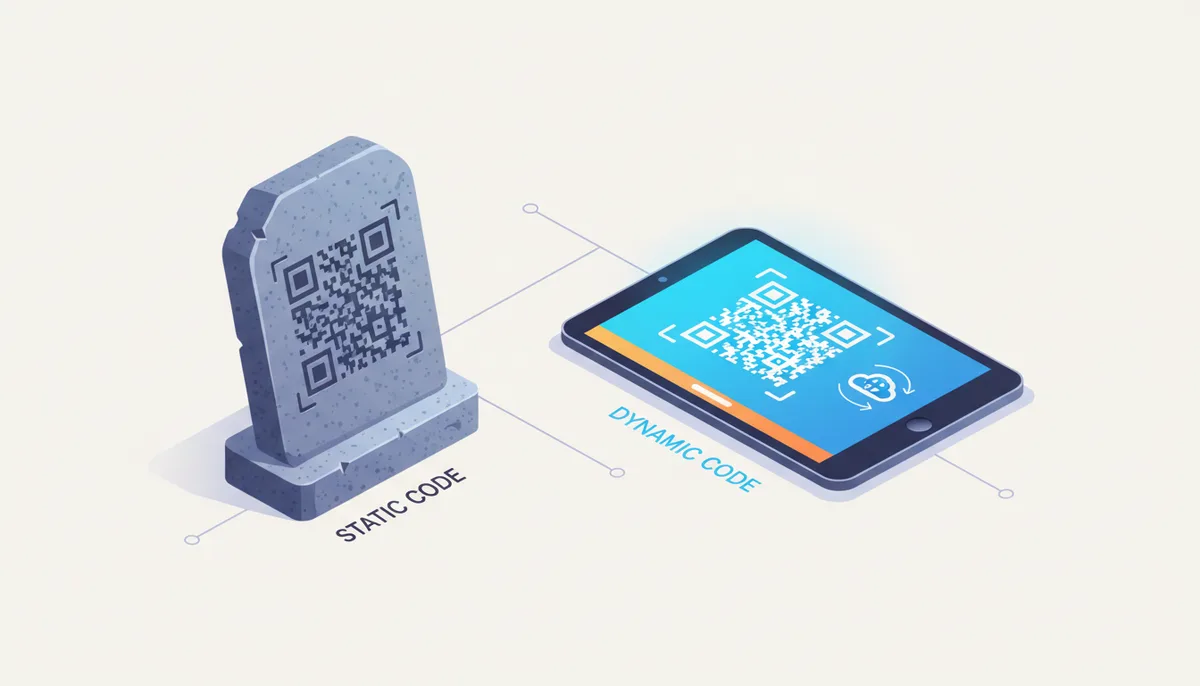
Which QR Code Is Right for Your Project? The 30-Second Answer
You're standing at a crossroads: static or dynamic QR code? Here's the fundamental difference. A static QR code is permanent and simple—like carving your phone number into stone. A dynamic QR code is flexible and powerful—like hiring a switchboard operator who can redirect calls wherever you need them to go.
Think of it this way: creating a static QR code is like printing a phone number directly on 10,000 flyers. Once printed, that number can't change. Creating a dynamic QR code is like printing the number of a receptionist who can forward calls anywhere. You can tell the receptionist to send calls to a different department tomorrow without reprinting a single flyer.
Here's your rule of thumb: if the information will never change—like your birthdate, your company's founding year, or the GPS coordinates of your building—use static. For anything in a business or marketing context—like a website link, a promotional offer, or a restaurant menu—use dynamic. The $10-30 monthly cost of dynamic codes pays for itself the first time you need to update something without reprinting.
What Is a Static QR Code and How Does It Work?
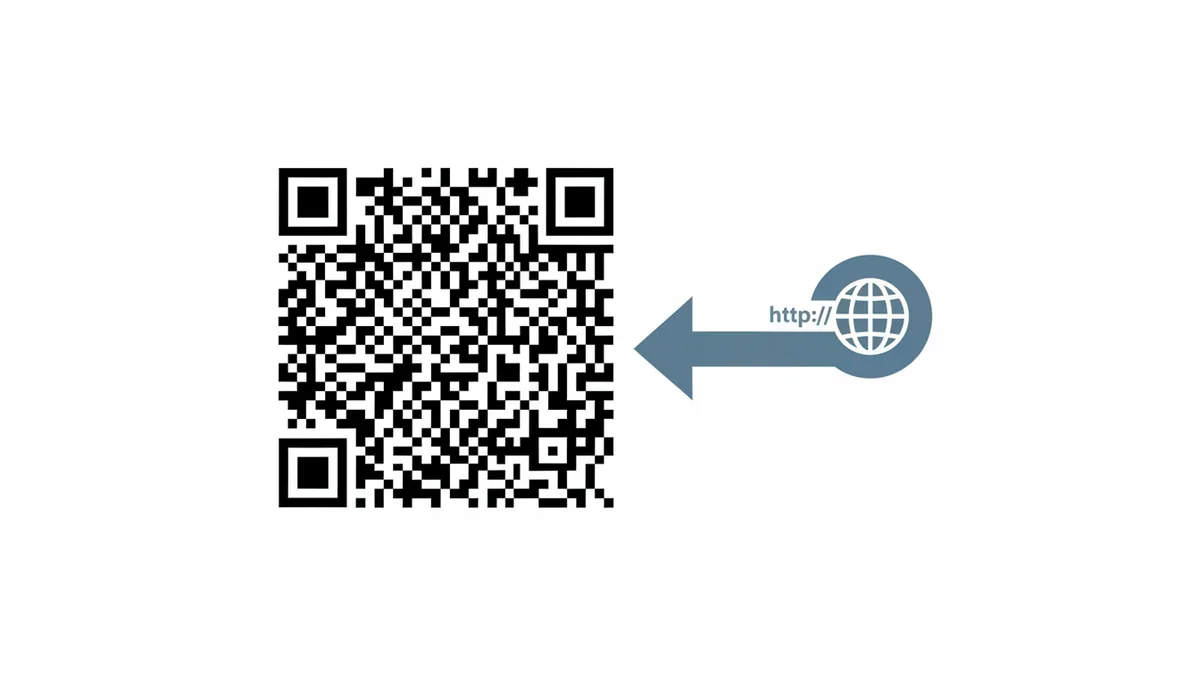
A static QR code is self-contained. The destination—whether that's a URL, a phone number, or Wi‑Fi credentials—is encoded directly into the black-and-white pattern you see. When someone scans it, their phone reads the pattern and immediately knows what to do, without needing to contact any server first.
This direct encoding means the QR code itself contains all the information. Your phone's camera sees the pattern, the QR reader app decodes it into "https://example.com/menu" or "Call 555-0123," and that's it. No middleman, no redirect, no dependency on anyone's server staying online.
The consequence? Once you generate and print that code, the destination is set in stone. Want to change where it points? You need to generate a completely new QR code with a different pattern, then replace every printed copy. There's no dashboard where you can log in and update it.
Static codes excel in specific scenarios. Use them for:
- Personal contact cards (vCard): Your name and phone number won't change often enough to matter
- Wi-Fi network access: The network name and password are stable for years
- Permanent web pages: Your company's main homepage URL that hasn't changed since 2015
- Manufacturing and inventory: Serial numbers, part identifiers, or other permanent data
- Bitcoin wallet addresses: Cryptocurrency addresses that must remain exact
The technical advantage? Static codes work completely offline once scanned. The QR reader doesn't need internet access to decode "Call 555-0123" from the pattern—though obviously making the actual phone call requires service. This makes static codes reliable in low-connectivity environments like trade show floors or rural areas.
But here's what catches people: the more data you encode, the more complex the pattern becomes. A QR code containing just "ABC123" has a simple pattern with large squares. A QR code containing a full vCard with name, company, email, phone, and address becomes dense with tiny squares. Denser patterns are harder to scan from a distance or when printed small.
What Is a Dynamic QR Code and How Does It Work?
A dynamic QR code contains a wolf in sheep's clothing. The pattern encodes a short URL that belongs to your QR code provider—something like "qr.example.com/abc123". When scanned, this URL redirects to your actual destination. You control where that redirect points through the provider's dashboard.
Here's the mechanism: You want a QR code for your restaurant menu at "myrestaurant.com/summer-menu". Instead of encoding that URL directly, the QR provider gives you a code containing "qrcodemachine.com/x7j9k2". When someone scans it, their phone contacts qrcodemachine.com, which instantly redirects them to your menu. Tomorrow, you can log into your dashboard and change the redirect to point to "myrestaurant.com/fall-menu" without touching the printed QR codes.
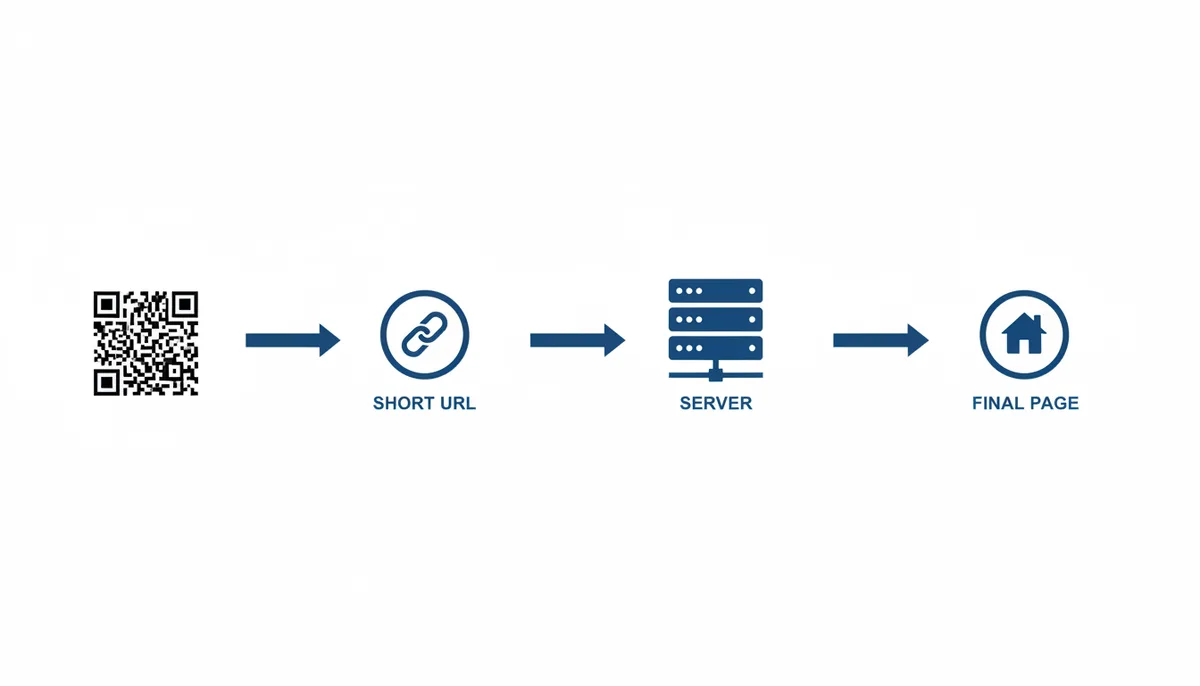
This redirect architecture enables three powerful capabilities:
1. Destination editing: Change where the QR code points anytime. Running a promotion that ends Friday? Saturday morning, update the code to point to your regular pricing page. No reprinting required.
2. Scan analytics: Every scan hits the provider's server first, so they can log it. You'll see total scans, unique scanners, scanning times, locations (city-level), device types (iPhone vs Android), and more. This data shapes future campaigns.
3. Advanced routing: Since the server processes each scan, it can make decisions. Send users in Tokyo to your Japanese landing page and users in London to your English page. Show different content on weekdays vs weekends. Require a password. The possibilities multiply.
The dependency is clear: dynamic QR codes require the provider's server to function. If their server goes down, your QR codes temporarily stop working. If you stop paying for the service, the redirects cease permanently. You're renting functionality, not buying it outright.
Dynamic codes maintain a consistent, simple pattern regardless of destination URL length. Whether redirecting to "x.com" or a 200-character URL with tracking parameters, the QR code looks the same. This consistent simplicity improves scan reliability.
Static vs. Dynamic QR Codes: A Head-to-Head Comparison
Let's compare these two types across the factors that actually affect your decision:
| Feature | Static QR Codes | Dynamic QR Codes |
|---|---|---|
| Edit Destination? | Never. Permanent once created. | Yes, unlimited changes via dashboard. |
| Track Scans? | No analytics available. | Full analytics: count, time, location, device. |
| Cost | Free forever. | $10-100/month depending on features. |
| Lifespan | Works forever, no dependencies. | Works only while subscription active. |
| Internet Required to Decode? | No, pattern contains all data. | Yes, must reach redirect server. |
| Code Complexity | Increases with data amount. | Always simple, regardless of destination. |
| Ideal Use Case | Personal use, permanent info. | Business use, marketing campaigns. |
The cost difference deserves attention. Static QR codes are genuinely free—generate one with any QR code tool and use it forever. Dynamic QR codes require a subscription because you're using the provider's servers and infrastructure for every scan. Pricing typically starts around $10/month for basic features and scales to $100+/month for enterprise features like API access and unlimited codes.
Consider scan reliability differently for each type. Static codes with lots of data become visually complex, making them harder to scan when printed small or viewed from a distance. Dynamic codes stay simple because the actual destination isn't encoded—just the short redirect URL. This means a dynamic QR code pointing to a 500-character URL scans as easily as one pointing to "google.com".
The dependency question cuts both ways. Static codes work forever without relying on any service, but they can't adapt when your needs change. Dynamic codes depend on a service staying online and your subscription staying active, but they give you control and visibility you'd never have otherwise.
How to Choose: A Decision Framework for Your Use Case
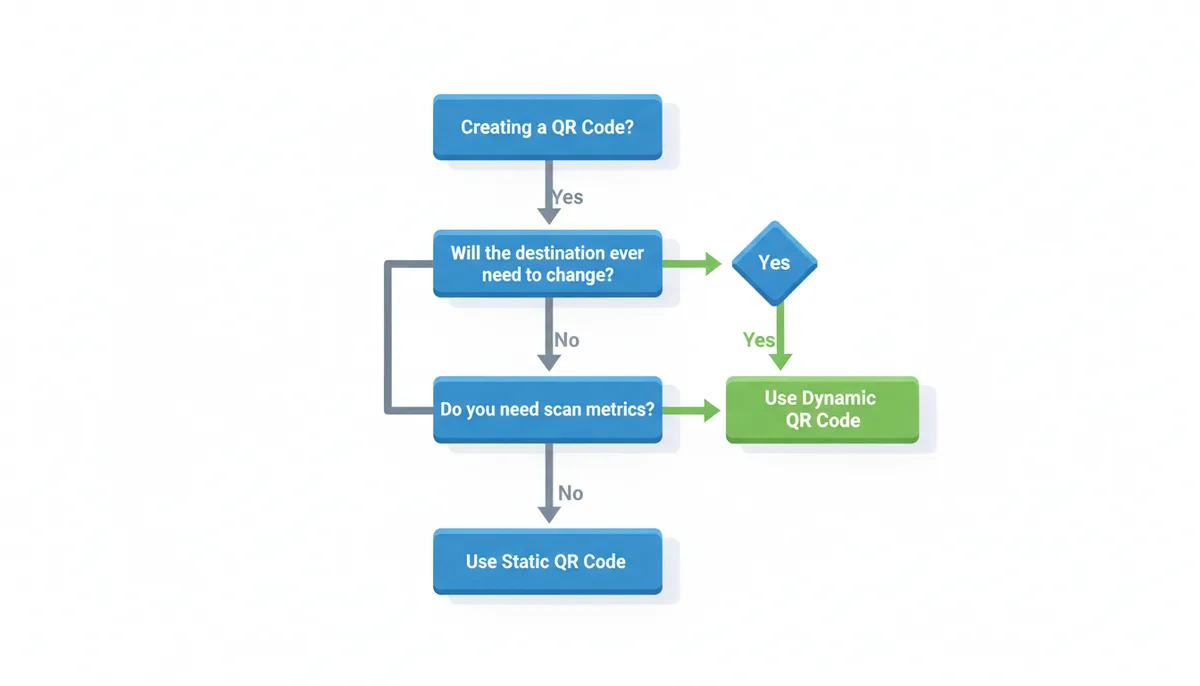
Stop guessing. Answer these questions in order, and you'll know exactly which type you need:
Question 1: Will the destination ever need to change?
Not might change, not could change—will it need to change? A restaurant menu changes seasonally (yes). A building's street address doesn't (no). A promotional landing page changes when the promotion ends (yes). Your LinkedIn profile URL might change if you customize it later (yes). If yes, use dynamic.
Question 2: Do you need to know who's scanning it?
Not want to know—need to know. A marketing campaign needs scan data to measure ROI. A business card would be nice to track but isn't essential. Museum exhibits need visitor flow data. Personal wedding invitations don't. If you need metrics, use dynamic.
Question 3: Is this a one-time cost or ongoing investment?
Printing 50 QR codes for a conference? That's one-time. QR codes on your product packaging? That's ongoing. Table tents in your restaurant? Ongoing. Temporary event signage? One-time. If it's an ongoing business function, the monthly cost of dynamic codes is a rounding error.
Real examples make this concrete:
Restaurant menu: Dynamic, always. Menus change for seasons, supply issues, pricing updates, and special events. The ability to update your menu without reprinting table tents or posters saves thousands annually.
Business card: Dynamic if you're in business, static if you're an individual. Companies rebrand, people change roles, websites get redesigned. That $10/month prevents your cards from becoming expensive trash.
Conference badge: Static for attendee contact info, dynamic for sponsor showcase links. Attendee details won't change during the event, but sponsors might want to update their landing pages based on booth conversations.
Product manual: Dynamic, surprisingly. Products get firmware updates, safety notices, and new accessories. Point to a living document that you can update as needed.
Wi-Fi credentials: Static. You're encoding the network name and password directly. When you change the Wi‑Fi password (rarely), you'll replace the QR code sign anyway.
Real estate signs: Dynamic. Update the listing details, add virtual tour links, or redirect to "SOLD" messages without climbing back up to change the sign.
The Superpowers of Dynamic QR Codes You're Missing Out On
Editing links and viewing scan counts barely scratches the surface. Professional QR code platforms offer features that transform simple codes into sophisticated marketing tools. Note that feature availability varies by platform and subscription tier—verify which capabilities your chosen provider offers at your price point.
A/B testing with automatic optimization: Create one QR code that randomly sends 50% of scanners to Landing Page A and 50% to Landing Page B. After gathering data, the platform can automatically start sending more traffic to the better-performing page. For example, a clothing retailer could test whether a "20% off" message performs better than "Buy 2 Get 1 Free"—even if the second offer provides more value, the simpler percentage discount might resonate more with customers.
Geotargeting at the city level: One QR code, different destinations by location. Imagine a hotel chain placing the same QR code on airport advertisements nationwide—scans in Los Angeles could show LA hotel deals while scans in Chicago display Chicago properties. The same printed ad serves every market without customization.
Password protection for exclusive access: Add a password prompt before users reach the destination. This could enable VIP customer previews where the QR code is publicly visible but only those with the password see exclusive content. Changing passwords daily creates time-limited exclusivity without reprinting codes.
Scheduling and expiration: Set codes to activate and deactivate on specific dates and times. A restaurant could program happy hour QR codes to show drink specials from 4–7 PM and the regular menu outside those hours. Black Friday promotional codes could automatically expire at midnight, redirecting to a "Sale Ended" page.
Device-based routing: Send iOS users to the App Store and Android users to Google Play with one code. Or route desktop scanners (yes, people scan with webcams) to a full website while sending mobile users to an app download.
Bulk generation with unique tracking: Generate 1,000 unique QR codes that all point to the same destination but track separately. Give each sales rep their own code for business cards. See exactly how many leads each person generates. Update all 1,000 destinations with one click when your website changes.
Retargeting pixel integration: Add Facebook, Google, or LinkedIn retargeting pixels to your QR code destinations. Everyone who scans your code gets added to your retargeting audience. Run social media ads specifically to people who engaged with your physical marketing materials.
These features can work together. Consider a hypothetical fitness studio with QR codes on outdoor banners. They could use scheduling to show class schedules during business hours and membership promotions after hours. Geotargeting could ensure people see information for the location nearest them. A/B testing could help determine whether "First Class Free" or "One Week Trial" drives more signups. Password protection could give current members access to exclusive workshop registrations. All capabilities would work through one printed banner that never needs updating.
Common Mistakes and How to Avoid Them
Experience teaches harsh lessons. Here are the mistakes that cost real money:
Mistake 1: Using static codes for anything that might change
Imagine printing 10,000 promotional flyers with a static QR code pointing to a landing page. Two weeks later, you redesign the page and change the URL structure. The flyers become worthless. To illustrate the economics: 10,000 flyers might cost $3,000 to design and print, while a dynamic code service runs $20/month. The false economy becomes clear.
The fix: Default to dynamic for any business use. The only question is whether you need static for a specific reason, not whether you can afford dynamic. You can't afford not to use dynamic.
Mistake 2: Using free trials for permanent codes
Consider what happens if you create dynamic QR codes for restaurant tables using a 14-day free trial. The analytics and easy menu updates work great. But if you don't convert to a paid plan, every QR code stops working when the trial ends—potentially on your busiest night, leading to frustrated customers and negative reviews.
The fix: Treat QR code service like utilities—budget for it before deploying. If you're testing, use a clearly temporary campaign. Once QR codes are in public, maintaining them becomes a business obligation.
Mistake 3: Not testing at actual scanning distance
Picture creating QR codes for poster boards meant to be viewed from 6 feet away, but only testing by scanning on a computer screen from 6 inches. At the actual event, attendees can't scan without awkwardly approaching the posters. An intricate logo in the center makes it worse.
The fix: Test your actual printed materials at realistic distances. A QR code for a business card needs to scan at 6 inches. A poster needs 3–6 feet. A billboard needs 10–20 feet. Increase error correction levels and simplify designs for distance scanning.
Mistake 4: Poor design destroying scannability
"Artistic" QR codes with gradient colors, rounded corners, and oversized logos might look beautiful but scan terribly. Light colors provide insufficient contrast. Rounded corners confuse scanner apps. Logos covering 40% of the code destroy too much data.
The fix: QR codes are functional first, pretty second. Maintain high contrast (black on white is unbeatable). Keep logos under 20% of the code area. Never alter the three square finder patterns in the corners. Test on multiple devices before mass production.
Mistake 5: Forgetting the human experience
A museum might place QR codes next to every exhibit, but if they lead to PDFs requiring download, visitors will scan once, wait for a slow download, then skip the rest. The QR codes technically work but fail their purpose.
The fix: Scan your own codes and experience the full journey. Optimize destination pages for mobile. Ensure fast loading. Remove download requirements. Make the payoff worth the effort of pulling out a phone.
| Scenario | Assumed Costs | Dynamic QR Alternative | Potential Savings |
|---|---|---|---|
| Retail chain updates (quarterly) | $3,000 printing + $1,200 labor per update | $89/month business plan | $15,732 annually |
| Restaurant menu changes (monthly) | $500 printing for 50 table tents | $30/month standard plan | $5,640 annually |
| Event signage (one-time) | $2,000 for 100 posters | $10/month for 3 months | Minimal—use static |
| Product packaging (permanent) | $0.10 per unit for QR printing | $50/month for tracking | Depends on update frequency |
These calculations assume specific scenarios. Your costs will vary based on print volume, update frequency, and local pricing. The key insight: any business updating QR destinations more than once per year likely saves money with dynamic codes, even before considering the value of analytics and advanced features.
Are There Any Downsides to Dynamic QR Codes?
Dynamic QR codes aren't universally perfect. Understanding their limitations helps you make informed decisions and plan contingencies.
Dependency on the provider creates genuine risk. Your QR codes work only as long as your provider stays in business and keeps their servers running. When Snapchat's Snapcodes were discontinued, every code stopped working. When Bitly had a major outage in 2022, millions of shortened links (and QR codes pointing to them) went offline for hours.
Choose providers with proven track records. QR Code Machine operates redundant infrastructure across multiple data centers. Look for companies that have been around for years, not months. Read their terms of service—what happens to your data if they shut down? Do they offer data export?
Ongoing costs add up. A single dynamic QR code might cost $10/month. Running 50 codes for different products means $500/month. Enterprise features like API access and white-labeling can push costs to thousands monthly. This isn't a one-time purchase like a domain name.
Budget realistically. Factor QR code service into your marketing operations budget like you would email marketing or web hosting. The cost is justified by the value—one prevented reprint pays for years of service.
Privacy and data concerns matter for sensitive applications. Every scan routes through the provider's servers. They see scan locations, times, and device information. For a restaurant menu, this data helps improve service. For confidential documents or private events, it might be unacceptable.
| Risk | Mitigation Strategy |
|---|---|
| Provider goes out of business | Choose established providers with multi-year history. Keep backups of destination URLs. |
| Monthly subscription costs | Budget as operational expense. Calculate against reprint costs. Start with needed features only. |
| Service outages affect all codes | Select providers with uptime SLAs. Have contingency plans for critical codes. |
| Data privacy concerns | Review privacy policies. Use static codes for sensitive data. Choose providers in your jurisdiction. |
| Vendor lock-in | Ensure data portability. Document all QR code destinations. Plan migration strategy upfront. |
Internet dependency limits certain uses. Dynamic QR codes need internet access to redirect. In airplane mode, underground parking garages, or rural areas without service, they fail completely. Static codes containing phone numbers or text work offline.
A practical approach: Use dynamic codes for marketing and business operations where analytics and flexibility justify the dependencies. Use static codes for critical information that must work everywhere—emergency contact info, equipment serial numbers, or offline documentation.
Real Numbers: What Dynamic QR Codes Actually Cost Your Business
Let's calculate the real economics. A marketing manager at a mid-size retailer shared their actual numbers from switching to dynamic QR codes last year. They manage QR codes across product packaging, in-store displays, and print advertisements.
Before dynamic codes: They updated their product catalog URLs quarterly as new items arrived and old ones discontinued. Each update meant reprinting shelf talkers for 200 products across 15 stores. Cost per print run: $3,000 for design and printing, plus $1,200 in labor to replace them in stores. Annual cost: $16,800.
After switching to dynamic codes: They pay $89/month for a business plan supporting 500 active QR codes. When URLs change, one person updates them in 20 minutes through the dashboard. Annual cost: $1,068 plus perhaps 2 hours of labor.
The savings are obvious, but the hidden value surprised them more. Their scan analytics revealed that Tuesday afternoons saw 3x more product research scans than any other time. They now schedule their email campaigns for Tuesday morning, driving people to research in stores that afternoon. Sales from QR-triggered research increased 40%.
Consider different business scales:
Freelancer or consultant: You need maybe 5-10 QR codes for business cards, portfolios, and marketing materials. Basic plans at $10/month cover this. Compare against reprinting 500 business cards when you change your portfolio URL—roughly $100 each time.
Restaurant with 50 tables: Each table needs a QR code, plus ones for takeout menus, delivery vehicles, and window displays. Figure 75 codes total. A $30/month plan handles this. The first prevented reprint when you change prices or add seasonal items saves a month of subscription fees.
Retail chain with 100 locations: You need codes for every product line, promotional display, and receipt campaign. Could be 1,000+ active codes. Enterprise plans run $300-500/month but include API access for automated updates. When corporate updates pricing or promotions, every store reflects changes instantly.
The break-even calculation is straightforward: How many times per year would you need to reprint materials? Once? Dynamic codes might not pay off. Quarterly? They're essential. Don't forget soft costs—customer frustration with outdated information, staff time handling confused shoppers, lost sales from dead links.
A fitness equipment manufacturer learned this lesson expensively. They printed static QR codes on 50,000 units linking to assembly videos. Six months later, they updated the video to address common mistakes. For two years, customers scanned codes and watched outdated instructions, leading to assembly errors and return rates 15% higher than necessary. The $50/month they saved by avoiding dynamic codes cost them tens of thousands in returns and support calls.
Technical Deep Dive: Why Some QR Codes Fail to Scan
You've experienced it—pointing your phone at a QR code that just won't scan. Understanding why helps you create codes that work every time. The problem usually isn't the technology but how people implement it.
QR codes use Reed‑Solomon error correction, with four levels available. Level L tolerates 7% damage, Level M handles 15%, Level Q manages 25%, and Level H—the highest—can still function with up to 30% of the pattern damaged or obscured. But this redundancy has limits. The algorithm needs to identify three corner "finder patterns" (the large squares) to orient itself. Damage these, and the code becomes unreadable regardless of error correction level.
The most common failure: insufficient contrast. QR scanners work by detecting the difference between dark and light modules. Dark gray on light gray might look stylish, but cameras struggle to differentiate. While no universal specification mandates an exact contrast ratio, a practical minimum of 4:1 helps ensure reliable scanning. Black on white gives you 21:1—use it whenever possible.
Size versus data density creates another failure point. A QR code encoding "HELLO" has 21×21 modules. One encoding a 200-character URL might have 57×57 modules. Print both at 1 inch square, and the complex code's modules are 64% smaller. Tiny modules become unscannable when printed on textured surfaces or viewed from standard distances.
Here's what actually happens during a scan: Your camera captures the image at varying resolutions depending on distance and lighting. The QR app must identify the finder patterns, determine orientation, map the grid, and decode each module as black or white. Motion blur, shadows, reflections, or low resolution can disrupt any step.
Practical fixes based on real failures:
Curved surfaces: Bottles and cylindrical packaging distort QR codes. The curve changes module shapes and can hide parts of the pattern. Solution: Place codes on flat areas or increase error correction to Level H (30% redundancy).
Glossy materials: Laminated posters and coated papers create reflections that blind cameras. The reflected light makes black modules appear white. Solution: Use matte finishes or position codes where overhead lighting won't create hotspots.
Textile printing: QR codes on t-shirts and bags face fabric texture and stretch. Threads disrupt fine details. Solution: Increase module size by using shorter URLs (dynamic codes help here) and avoid complex logos.
Distance scanning: A billboard QR code needs modules visible from 20 feet. A practical rule of thumb suggests dividing the scanning distance by 10 for minimum code size—so a 20-foot scanning distance might need a 2-foot QR code. However, lighting conditions, camera quality, and module density all affect real-world performance, so always test at actual distance.
The quiet zone—the white border around QR codes—isn't decorative. Scanners use it to identify where the code begins. The spec requires a border equal to 4 modules wide. Designers constantly violate this, extending backgrounds to the edge. Their codes fail mysteriously until someone adds white space.
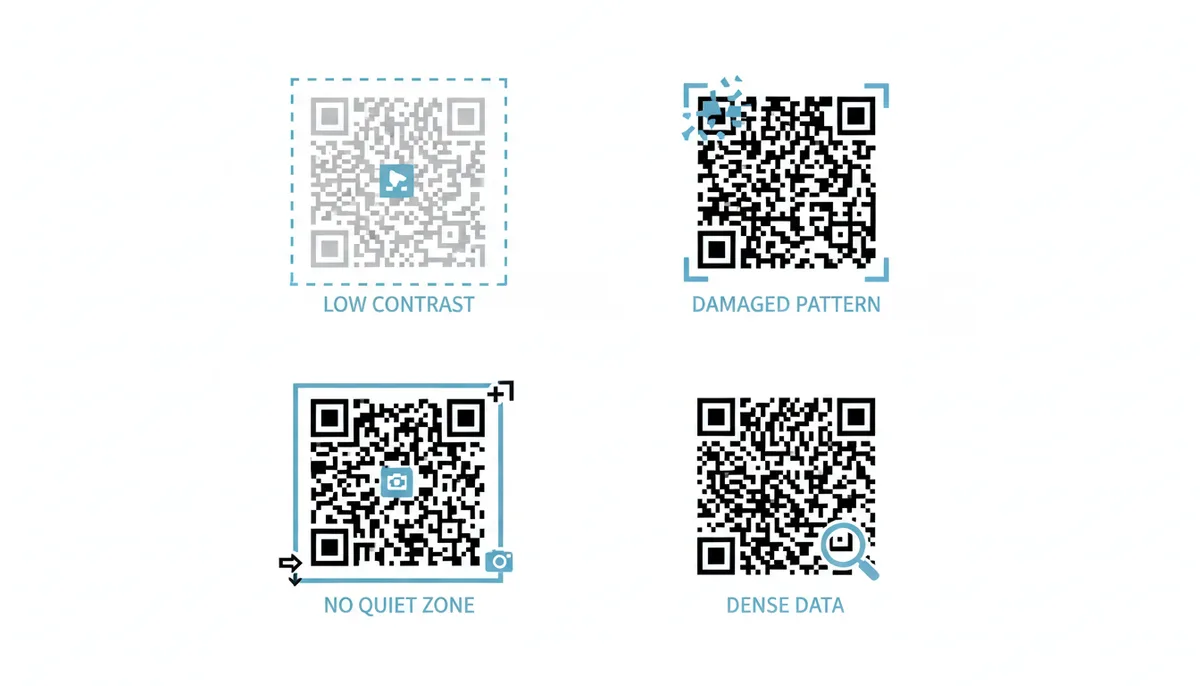
Testing prevents these failures. Print your actual code at actual size on actual material. Scan from your expected distance under various lighting. Try different phones—older Android devices often have worse cameras than current iPhones. What scans perfectly on your phone might fail on your customer's.
FAQ
Can I change a static QR code to a dynamic one after it's been made?
No, you cannot convert a static QR code into a dynamic one. The patterns are fundamentally different—a static code contains the actual destination data, while a dynamic code contains a redirect URL. To gain dynamic capabilities, you must create an entirely new QR code and replace all instances of the old static code. Think of it like trying to turn a printed photograph into a digital screen—you need to start over with different technology.
What happens to my dynamic QR code if I stop paying for the service?
Your QR codes stop working immediately when your subscription ends. The short URL encoded in your QR code will either show an error message or redirect to the provider's website instead of your intended destination. This is the fundamental trade-off of dynamic codes—you're renting the redirect service, not owning it. Some providers offer a grace period or downgrade to limited functionality, but most simply deactivate the codes. Always maintain your subscription if you have codes in active use.
Can a QR code be scanned an unlimited number of times?
Yes, both static and dynamic QR codes can be scanned infinitely without wearing out or degrading. The code itself doesn't track or limit usage. However, some dynamic QR code services offer scan limits as a feature—useful for limited promotions or exclusive content. You might set a code to work for only the first 1,000 scans or deactivate after reaching a threshold. The physical code remains scannable; the service simply changes where it redirects.
Can I track scans on a static QR code?
Not directly through the QR code itself. However, you can encode a trackable shortened URL (like a Bitly link) into a static QR code. This gives you basic analytics—scan count and general timing—but you sacrifice the ability to edit the destination later. You're essentially creating a permanent code pointing to a redirect you can measure but not change. This hybrid approach rarely makes sense; if you need tracking, use a proper dynamic QR code.
Are dynamic QR codes slower for the user?
Technically yes, but imperceptibly so. The extra redirect adds 50–200 milliseconds in typical conditions—less time than a single eye blink. Users experience this as instant. The redirect happens at internet speeds while their browser is still loading. In practice, the destination website's load time matters far more than the redirect delay. A slow-loading destination page creates a poor experience regardless of QR code type.
Which type is better for printing on merchandise or packaging?
Dynamic QR codes are almost always the right choice for products. Your product might outlive your current website, promotional offers change seasonally, and instruction videos get updated with new product versions. A dynamic code ensures that the QR code on packaging manufactured today still works correctly when sold two years from now. The only exception might be permanent information like batch numbers or manufacturing dates that truly never change—but even then, you might want scan analytics to track product engagement.
Sources
- ISO (International Organization for Standardization) — The technical specification for QR codes is ISO/IEC 18004. This source backs any claims about the underlying technology standard, data capacity, and error correction levels.
- Denso Wave Incorporated — As the inventors of the QR code, their official site is the primary source for the history, basic functionality, and original purpose of the technology.
- GS1 — GS1 is the global standards body for barcodes. Their Digital Link standard heavily utilizes QR codes, providing authority for claims about their use in retail, supply chain, and connecting physical products to the web.
- The Apache Software Foundation — This documentation for Apache's URL rewriting module is a technical source for how server-side redirects—the core mechanism behind dynamic QR codes—work in practice.