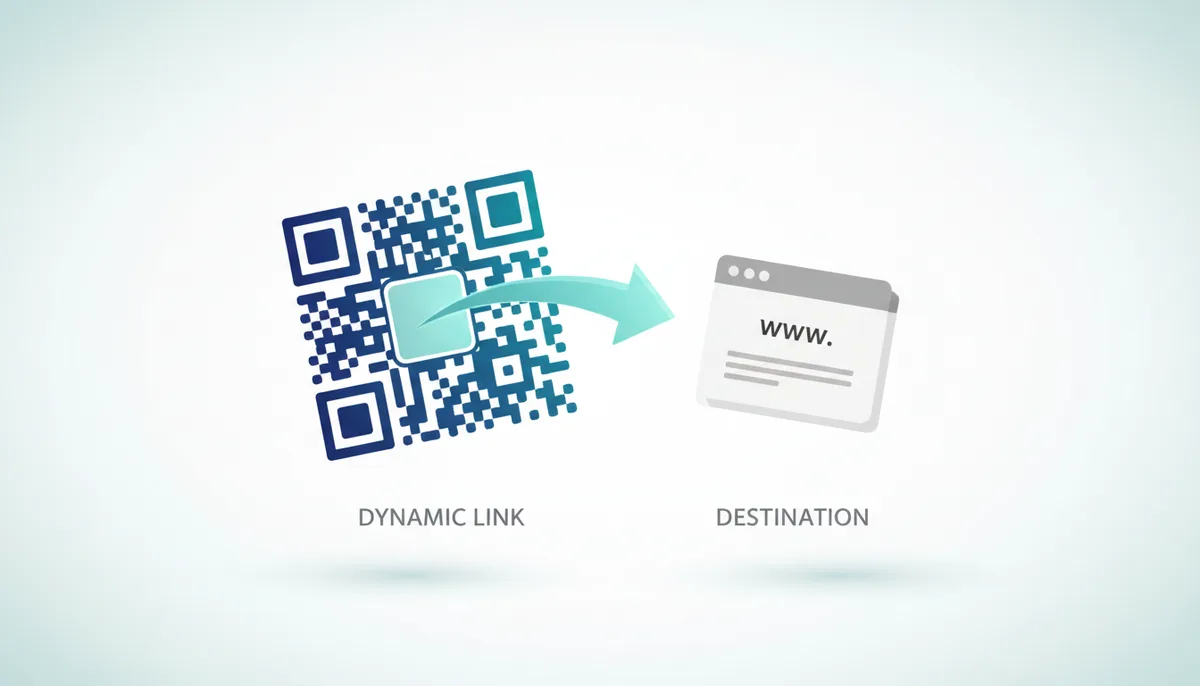
You’ve probably seen them everywhere – QR codes on restaurant tables, posters, and business cards. But have you ever wondered how a single QR code can change where it sends you, even after it’s been printed?
Or how those scan statistics you sometimes see actually work? It isn't magic. It’s a clever piece of server-side redirection. People often assume that changing a QR code's destination requires a new code, but that's true only for the older, "static" type. We're going to break down exactly how dynamic QR codes pull this off, going beyond the surface to explain the processes that happen with every scan.
1. Why Can't You Edit a Standard (Static) QR Code?
Let's start with what doesn't work, and why. A standard, or “static,” QR code is like a printed book. The information it contains – a URL, text, contact details, whatever it may be – is directly encoded into its visual pattern. This encoding follows the ISO/IEC 18004 standard, which defines the rules for reading these patterns. If you encode "https://www.example.com" into a QR code, that's what it will *always* represent. The pattern itself is the data. You can scan it with any QR code reader, and it will always resolve to that initial URL.
Because the data is baked directly into the image, changing the destination means generating a completely new QR code. It will look different, have a different pattern, and require reprinting anything that displays the code. It's a laborious process, and clearly unsuitable for anything that might need updating – like a promotion with a limited timeframe, or a URL that’s subject to change.
2. The Core Difference: What's Encoded in a Dynamic QR Code?
This is where dynamic QR codes come in. They get around the immutability problem by not encoding the final destination URL at all. Instead, a dynamic QR code encodes a stable, intermediate URL – a short URL – provided by the QR code service. Think of it like a forwarding address. For example, when you create a dynamic QR code with QR Code Machine, it might assign it a short URL like “qrcm.me/xyz123”.
The key is that "qrcm.me/xyz123" never changes, even if the actual destination does. The printed QR code always points to this fixed address. It's this unchanging short URL that is encoded in the QR code itself. This allows for a persistent visual representation even as the final destination is updated.
3. The Redirect Journey: A Step-by-Step Guide to a Scan
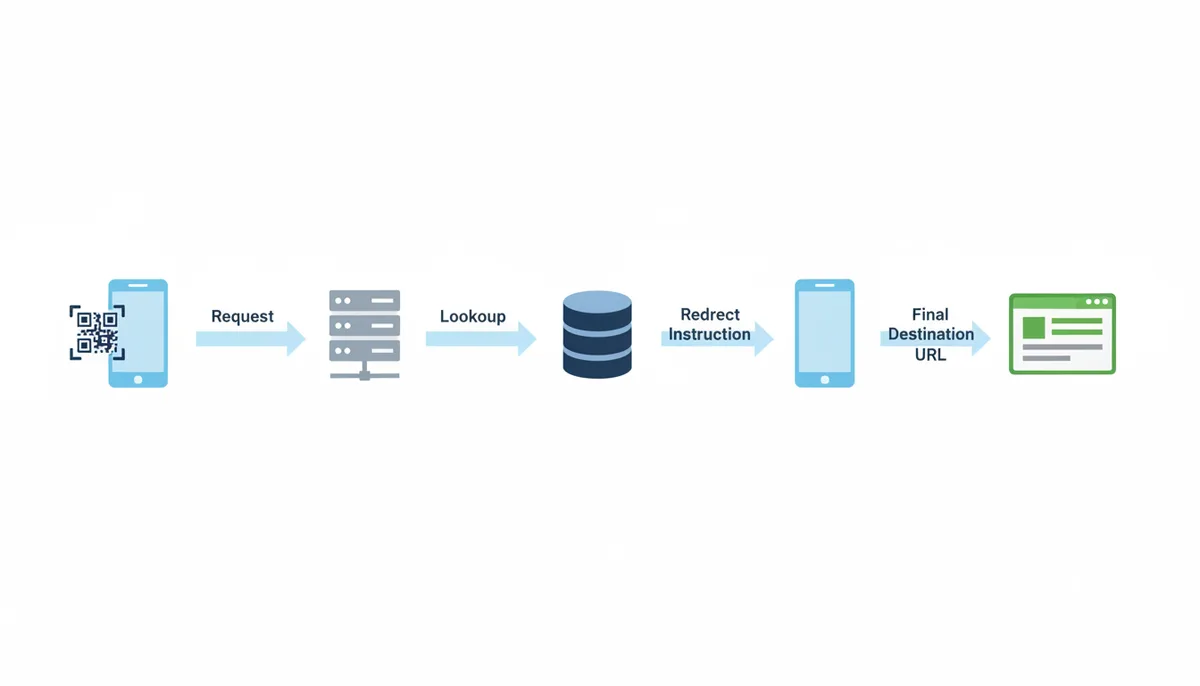
Okay, so how does this actually work when someone scans the code? Let’s walk through the process, step by step:
- Scan: A user scans the QR code with their smartphone. The phone's camera app or a dedicated QR code reader app interprets the visual pattern and extracts the encoded short URL (e.g., qrcm.me/xyz123).
- Request: The smartphone's browser then makes a request to that short URL. It's a standard HTTP request, just like typing the address into a browser.
- Lookup: The QR code provider's server (in this case, qrcodemachine.com) receives the request. It consults its database to find which final destination URL is currently associated with that short URL (qrcm.me/xyz123).
- Redirect: The server doesn't directly serve the content of the final destination. Instead, it responds with an HTTP redirect instruction – a message telling the browser to go to a *different* address.
- Final Request: The browser automatically follows the redirect instruction and requests the final destination URL. The user is seamlessly taken to the intended website or content.
The entire process unfolds in a fraction of a second, typically unnoticed by the user. The QR code provider’s server acts as a crucial ‘traffic controller’ or ‘switchboard operator’, directing traffic based on the configuration stored in its database.
4. How Does This Process Enable Editing and Tracking?
The redirect mechanism is the key to both editing and tracking. "Editing" a dynamic QR code isn’t about changing the code itself; it’s about updating the mapping between the short URL and the final destination URL within the provider’s database. You log into your QR Code Machine account, find the QR code you want to modify, and change the target URL. That's it. The QR code image itself remains visually unchanged.
Tracking works in a similar fashion. Because every scan request goes through the provider’s server, they can log each request *before* sending the redirect. This results in a count of scans. That scan data, along with information gathered during the redirect process (covered in the next section), is what provides meaningful analytics on the performance of your QR code.
The printed QR code remains untouched during both editing and the collection of tracking data. The power lies in the server-side logic and database management within the QR code provider’s infrastructure.
5. Inside the Analytics: What Data Is Collected During the Redirect?
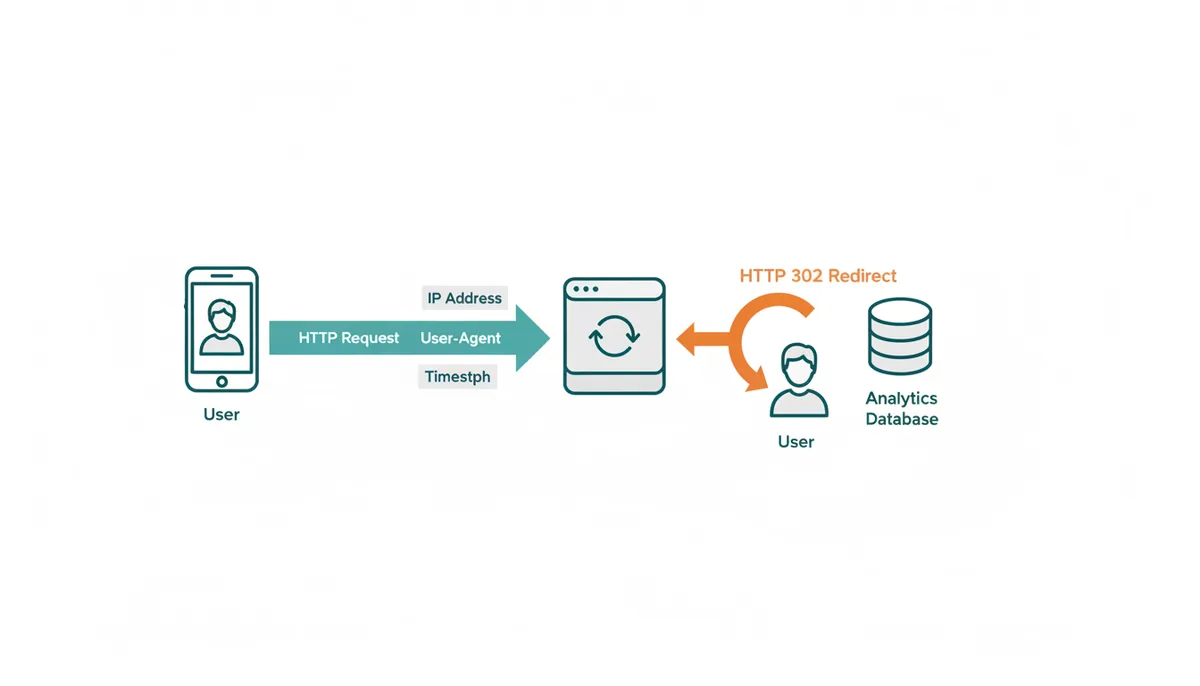
When the provider’s server receives a request for a short URL, it has the opportunity to gather data about the scan. This isn’t necessarily about personally identifying users, but rather collecting information that reveals trends and insights. This data is found in the standard HTTP request headers.
Here’s a breakdown of what’s commonly collected:
- Timestamp: The exact date and time of the scan. Crucial for understanding when scans are happening.
- IP Address: The user's IP address. This can be used to approximate their geographic location (country, city).
- User-Agent: A string provided by the user’s browser that identifies the device type (smartphone, tablet, desktop), operating system (iOS, Android, Windows), and browser (Chrome, Safari, Firefox). This helps understand what kind of devices are scanning your codes.
- Referrer: The URL of the page where the QR code was scanned (if available).
Providers may aggregate, truncate, anonymize, or retain this data for limited periods, depending on their privacy policy and configuration. Reputable platforms will comply with relevant data privacy regulations (like GDPR or CCPA). However, it’s vital for businesses to check the provider’s retention policies, obtain appropriate consent where needed, and ensure their own use of scan analytics complies with all applicable privacy laws.
6. Choosing the Right Detour: Which Redirect Type is Used?
HTTP redirects come in different flavors. The two you’ll encounter most often are 301 (Moved Permanently) and 302 (Found/Temporary). Understanding the difference is critical for dynamic QR codes.
A 301 redirect tells the browser that a resource has been permanently moved to a new location. Browsers aggressively cache this information, meaning they might not check back with the server for updates. This is great for SEO when a website changes domains, but terrible for dynamic QR codes.
A 302 redirect, on the other hand, indicates a temporary move. The browser understands that the resource might be available at a different location in the future and will check back with the server on each subsequent request. This is the industry standard for dynamic QR codes. It ensures that any changes you make to the destination URL are reflected immediately on the next scan.
A third, less common option – Meta Refresh or JavaScript Redirects – should be avoided for QR codes as they're unreliable, impact user experience and aren’t SEO friendly.
| Redirect Type | Meaning | Browser Caching | SEO Impact | Ideal for Dynamic QR Codes? |
|---|---|---|---|---|
| 302 Found (Temporary) | Resource is temporarily located elsewhere. | Minimal - Browser checks server on each request. | Minimal. Doesn’t pass link equity. | Yes |
| 301 Moved Permanently | Resource has permanently moved to a new location. | Aggressive - Browser caches for a long time. | High. Passes most link equity. | No |
| Meta Refresh / JavaScript Redirect | Uses HTML meta tag or JavaScript to redirect. | Unreliable | Poor | No |
7. Advanced Redirects: What Else Can a Server Do?
The beauty of server-side redirects is that they’re not limited to simple URL changes. You can configure sophisticated logic to deliver different experiences based on various factors. This opens up a world of advanced marketing possibilities.
Here are a few examples:
- A/B Testing: Randomly send users to different landing pages to test which version performs better.
- Device-Based Redirects: Detect the user's operating system and send iOS users to the App Store and Android users to the Google Play Store.
- Geolocation Redirects: Serve different content based on the user's location (e.g., display a local menu if they're in a specific city).
- Scheduled Redirects: Show a lunch menu before 3 PM and a dinner menu after 3 PM.
All of these are achieved by defining rules on the QR code provider’s server. The server evaluates the incoming request (looking at the user agent and IP address, for example) and then decides which destination URL to serve during the redirect process.
8. What Happens When a Redirect Fails?
While dynamic QR codes are powerful, troubleshooting issues can sometimes be tricky. Here’s a guide to common symptoms and their likely causes:
- Camera cannot recognize the QR code: This usually indicates a problem with the QR code itself – it might be damaged, poorly printed, or the contrast ratio isn't sufficient for the camera to decode it.
- Phone opens the short URL but it times out or shows DNS/server error: This suggests a problem with the QR code provider's server or network connectivity. The phone can decode the code, but can't establish a connection with the redirect server.
- Short URL loads a QR service error page: This usually means the dynamic QR code has been expired, disabled, or misconfigured within the provider’s platform.
- Redirect succeeds but final page is 404 'Not Found': This indicates the destination URL you’ve set is broken or no longer exists on the target website.
Here’s a troubleshooting sequence:
- Scan the QR code with your phone.
- Copy the short URL from the QR code reader and open it directly in your browser.
- If the short URL fails to load, the issue is likely with the QR code provider.
- If the short URL loads correctly, test the final destination URL directly in your browser.
| Symptom | Likely Cause | Who is Responsible? (Provider/User) |
|---|---|---|
| Camera cannot recognize the QR code | Print quality, damage, or design issues with the QR code | User |
| Phone opens the short URL but it times out or shows DNS/server error | Provider server outage or network connectivity issues. | Provider |
| Short URL loads a QR service error page | Expired, disabled, or misconfigured dynamic code. | User |
| Redirect succeeds but final page is 404 'Not Found' | Broken or non-existent destination URL | User |
9. Diving Deeper: The Server-Side Architecture Behind the Magic
We’ve explained the ‘what’ and ‘how’ of dynamic QR code redirects, but let’s pull back the curtain further and look at a typical architecture that makes it all possible. It’s more than just a simple database lookup.
A robust dynamic QR code platform leverages several key components working in concert. At the core is a short-code routing layer that receives incoming HTTP requests for the short URLs. This layer is fronted by a load balancer to distribute traffic across multiple web servers for scalability and redundancy. Behind this resides a database or key-value store that maps short codes to their corresponding destination URLs. For example, a record in the database might look like this:
short_code: qrcm.me/xyz123
destination_url: https://www.example.com
status: active
owner: user123
created_at: 2023-10-27T10:00:00Z
rules: {}
expires_at: null
An analytics logging system records every request, providing data for tracking scans. A rule engine applies any custom logic, such as geolocation redirects or A/B testing. An admin/API layer allows users to create, update, and manage their QR codes. Finally, a comprehensive monitoring system tracks performance and alerts administrators to any issues.
Providers may cache lookups of short codes to destination URLs to improve speed, but they must use short Time-To-Live (TTL) values or implement cache invalidation mechanisms to ensure that destination URL changes are reflected quickly. Although CDNs are often used to serve static assets, broadly caching dynamic redirect responses would defeat the purpose of a dynamic QR code.
10. A Real-World Example: Restaurant Weekly Specials
Let’s walk through a practical scenario. Imagine a local Italian restaurant, “Bella Notte,” wants to promote its weekly specials using a dynamic QR code. They don’t want to reprint menus every week; they want a single QR code that always points to the latest offers.
Bella Notte signs up for a QR Code Machine premium account. They create a dynamic QR code linked to a short URL: qrcm.me/bellanotte-specials. They initially point this short URL to a landing page showcasing the specials for October 26th-November 1st: https://www.bellanotte.com/specials-oct26. They print this QR code on table tents, flyers, and their website.
Each time a customer scans the code:
- Their phone sends a request to qrcm.me/bellanotte-specials.
- QR Code Machine’s server receives the request.
- The server looks up the association in its database. Currently, qrcm.me/bellanotte-specials is mapped to https://www.bellanotte.com/specials-oct26.
- The server sends a 302 redirect to the customer’s phone, instructing it to go to https://www.bellanotte.com/specials-oct26.
- The customer’s browser loads the October 26th specials page.
When the next week rolls around, Bella Notte updates the short URL to point to the new specials page (https://www.bellanotte.com/specials-nov2). This takes just a few clicks in their QR Code Machine dashboard. No new QR code is needed. The next customer to scan the code will be seamlessly redirected to the updated specials. Bella Notte can also track how many people scanned the code each week, valuable data for assessing the promotion’s effectiveness.
This example highlights the core benefit: flexibility and the elimination of expensive re-printing. It also shows the importance of a user-friendly dashboard for managing the redirects. Without that ease of use, the benefits of a dynamic code are drastically reduced.
11. The Pitfalls: Common Problems and How To Avoid Them
Dynamic QR code redirects are generally reliable, but things can and do go wrong. Here’s a rundown of common issues and how to mitigate them.
Downtime: The QR code provider's server goes down. This is the biggest risk. Mitigation: Choose a provider with a strong track record of uptime and redundancy. Look for Service Level Agreements (SLAs) that guarantee a certain level of availability. Consider providers offering custom domain integration, so you aren't completely reliant on their hostname.
Slow Redirects: The redirect takes too long, resulting in a poor user experience. Mitigation: Monitor the redirect speed using tools like WebPageTest or GTmetrix. Choose a provider with servers located geographically close to your target audience. Avoid complex server-side logic that can slow down the process.
Incorrect Configuration: You accidentally enter a broken URL as the destination. Mitigation: Double-check the destination URL *before* saving it. Implement a testing process – scan the QR code yourself to ensure it redirects correctly.
Domain Expiration: The QR code provider lets its domain expire (rare, but it happens!). Mitigation: This is another reason to choose a reputable provider. If you self-host a redirect server, meticulously manage your domain registration.
Caching Issues: Although a 302 redirect *shouldn't* be cached, aggressive browser caching can sometimes cause problems. Mitigation: Clear your browser cache to test changes. Configure your web server to send appropriate cache-control headers.
Analytics Discrepancies: Incorrect tracking data due to ad blockers or privacy settings. Mitigation: Understand that analytics data is never 100% accurate. Focus on trends rather than absolute numbers.
12. Dynamic vs. Alternative Solutions: URL Shorteners & Custom Landing Pages
Dynamic QR codes aren’t the only way to achieve a flexible link destination. Let’s compare them to two common alternatives: URL shorteners and custom landing pages with links.
URL Shorteners: Services like Bitly or TinyURL provide short URLs that redirect to longer ones. Similar to dynamic QR codes, you can update the destination URL after the short URL has been published. However, URL shorteners typically don't offer the features specifically tailored for QR code marketing (analytics, bulk generation, logo integration, custom domains). They also may not have the same level of reliability or scalability as a dedicated QR code platform.
Custom Landing Pages: You could create a simple landing page with links to different destinations and use a static QR code to point to that landing page. This gives you more control over the user experience, but it requires more effort to create and maintain the landing page. You still need to update the landing page’s content whenever the destination changes, and it doesn’t provide the same level of tracking granularity as a dynamic QR code.
Here's a comparative table:
| Feature | Dynamic QR Codes | URL Shorteners | Custom Landing Pages |
|---|---|---|---|
| Ease of Update | Very Easy | Easy | Moderate |
| Analytics | Detailed, QR-Specific | Basic | Requires Implementation |
| Customization | High (Logo, Colors) | Limited | Full Control |
| Cost | Subscription Fee | Free/Paid Plans | Development & Hosting Costs |
| Effort | Low | Low | High |
In summary: If you need a quick and free solution and don’t require advanced features, a URL shortener might suffice. If you have specific branding requirements and are comfortable with web development, a custom landing page could work. But for most marketing scenarios, dynamic QR codes offer the best balance of flexibility, analytics, and ease of use.
FAQ
If the QR code provider's server is down, is my QR code broken forever?
No, it is only broken temporarily. The redirect will start working again as soon as the provider's service is restored. However, this highlights the risk of relying on a third-party service for your code's functionality.
Can I change a dynamic QR code into a static one?
No. The data encoded in a dynamic QR code is the provider's short URL. To make it static, you must generate a completely new QR code that directly encodes your final destination URL.
Do dynamic QR codes expire?
Yes, they often do. Most providers link dynamic code functionality to a paid subscription. If you cancel your plan, they will disable the redirect. Some platforms also allow you to set your own expiration dates or scan limits.
Does the redirect process slow down the experience for the user?
It adds a step, but a well-optimized redirect server adds only a fraction of a second (typically 50-200 milliseconds) and is not noticeable. A slow provider, however, can create a frustrating delay for the user.
Are dynamic QR codes less secure than static ones?
They introduce an element of trust in a third-party provider. The security depends on the provider's practices. A compromised provider could have its redirects maliciously altered, a risk that doesn't exist with self-contained static codes.
Can I use my own domain for the short URL?
Yes, many professional QR code platforms offer this feature, often called ‘white-labeling’ or ‘custom domains’. This improves branding and gives you control over the domain, protecting you if the provider ever shuts down.
Sources
- ISO (International Organization for Standardization) — The technical specification of the QR code symbol itself (ISO/IEC 18004), which defines how data is encoded into the visual pattern.
- Denso Wave — The origin and fundamental principles of QR codes, as they are the original inventors.
- MDN Web Docs (Mozilla) — The technical definitions and client-side behavior of HTTP redirects, particularly the distinction between 301 and 302 status codes.
- IETF (Internet Engineering Task Force) — The official internet standard (RFC 9110) for HTTP semantics, which provides the definitive technical specification for status codes like 301 and 302.
- Google Search Central — The impact of different redirect types (301 vs. 302) on search engine indexing and crawling, which is relevant for the 'Types of Redirects' section.