The Sinking Feeling of a Printed Mistake
You’ve printed 10,000 flyers for your summer sale, and the QR code leads to the wrong landing page. Or worse, your event details change last minute, and the code on your posters is now outdated. The cost of reprinting isn’t just the paper and ink — it’s the lost leads, the frustrated customers, and the hit to your brand’s credibility.
A dynamic QR code is the insurance policy you didn’t know you needed. It lets you update the destination URL without touching the printed code, saving you from costly reprints and keeping your campaigns flexible.
Static vs. Dynamic: What's Really Happening When You Scan?
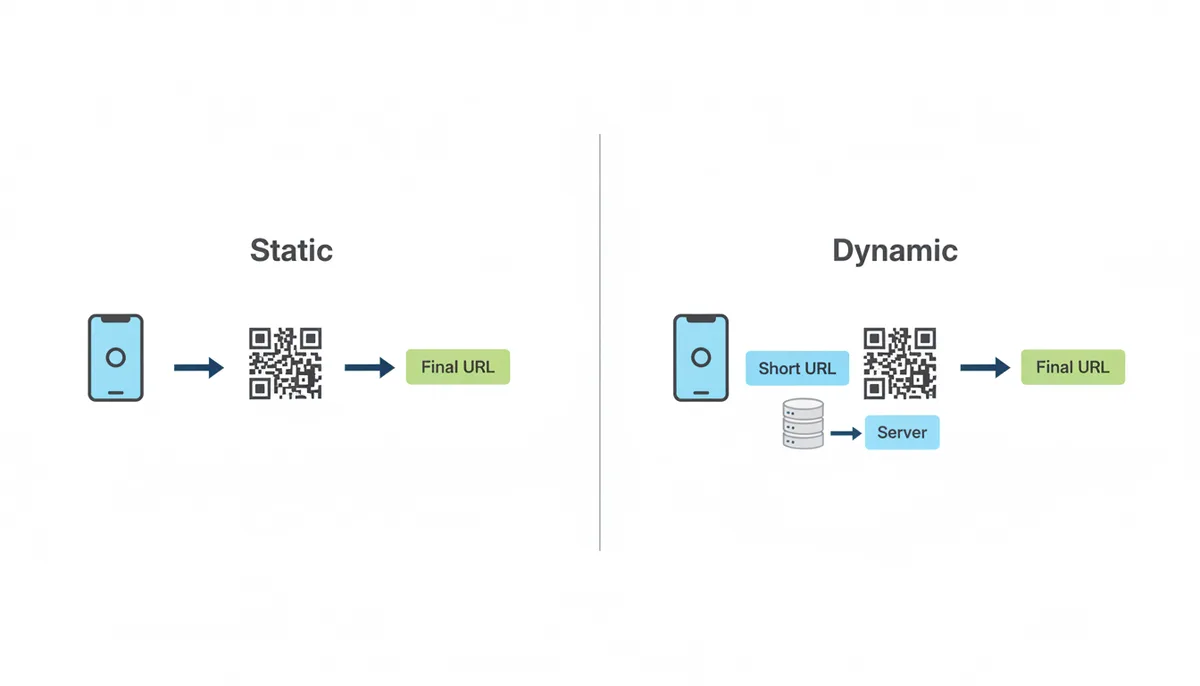
Static QR codes embed the final data (like a URL or text) directly into the pattern. Once printed, that data is permanent. If you need to change it, you’re stuck reprinting. QR codes are a defined technology under an international standard, which is why the encoding is permanent for static codes.
Dynamic QR codes work differently. They contain a short, unchangeable URL that points to a server. That server then redirects to the final, editable destination. Think of it like a mail-forwarding service: the address on the envelope (the QR code) stays the same, but where it’s forwarded (the final URL) can change anytime.
The Decision Framework: When is a Dynamic QR Code Non-Negotiable?
To decide whether a dynamic QR code is worth the investment, compare the cost of reprinting static codes against the subscription cost of dynamic ones. Use this scoring model to evaluate your campaign:
| Factor | Score (1-5) | Threshold |
|---|---|---|
| Print quantity | 1-5 | Score 3+ (500+ copies) suggests dynamic |
| Campaign duration | 1-5 | Score 4+ (6+ months) suggests dynamic |
| Content change likelihood | 1-5 | Score 3+ (likely to change) suggests dynamic |
| Analytics importance | 1-5 | Score 4+ (critical for tracking) suggests dynamic |
| Reprint lead time | 1-5 | Score 5 (urgent updates needed) suggests dynamic |
Add your scores and compare to these rules:
- Total 15-18: Static is likely sufficient
- Total 19-22: Dynamic may be justified
- Total 23-25: Dynamic is strongly recommended
Example: A 10,000-copy menu (score 5) running 12 months (score 5) with seasonal updates (score 4), tracking needs (score 4), and urgent update requirements (score 5) would total 23, clearly favoring dynamic QR codes.
Dynamic QR Codes in Action: 7 Scenarios Where Static Fails
1. Restaurant Menus
Seasonal specials, price changes, or dietary updates? A dynamic QR code lets you update the menu without reprinting. Pro tip: Use UTM parameters to track which dishes are most popular.
2. Product Packaging
Need to update manuals, promotions, or warranty info? A static code locks you into outdated content. A dynamic one keeps your packaging current.
3. Business Cards
Job changes, new contact info, or updated portfolios? A dynamic QR code ensures your card always leads to the right place.
4. Real Estate Signs
Price drops, open house changes, or property status updates? A dynamic QR code keeps potential buyers informed without reprinting signs.
5. Event Marketing
Schedule changes, last-minute updates, or post-event redirects? A dynamic QR code adapts to your needs.
6. Retail Displays
Weekly sales, new product launches, or flash promotions? A dynamic QR code lets you update offers on the fly.
7. Long-Term Print Ads
Billboards, posters, or magazine ads with long shelf lives? A dynamic QR code ensures the destination stays relevant.
Unlocking ROI: How to Measure Success with QR Code Analytics
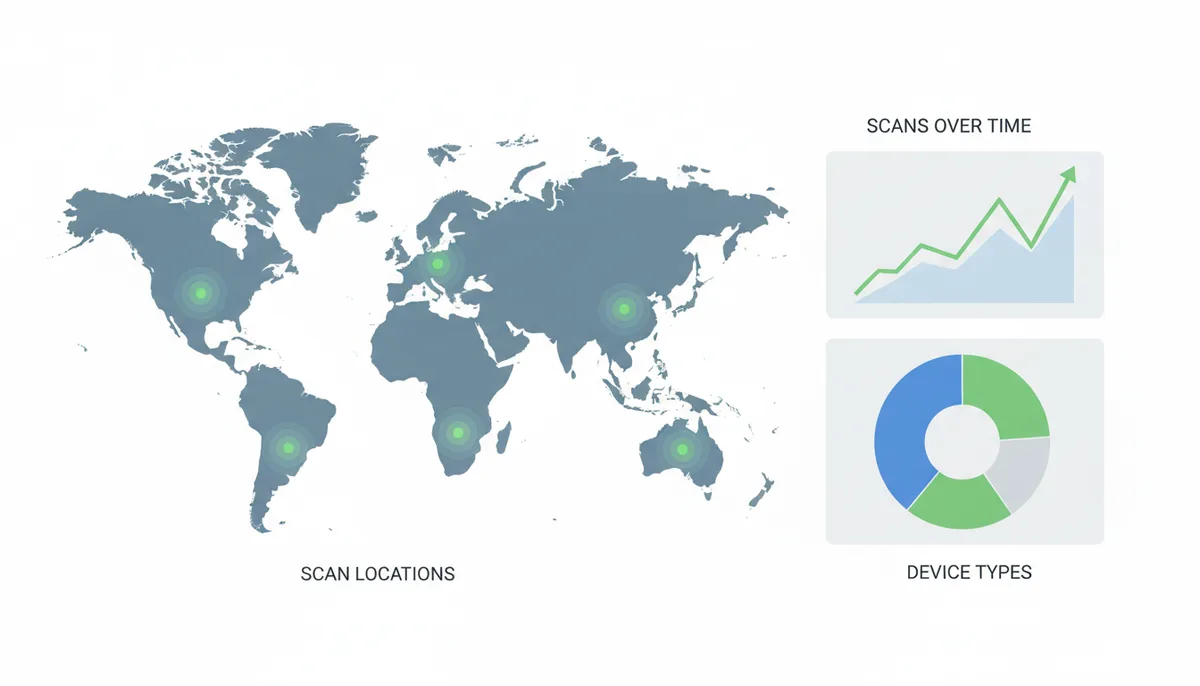
Dynamic QR codes don’t just let you edit — they also track. Key metrics include:
- Total scans
- Unique scans
- Scan time/date
- Location (city/country)
- Device type (iOS/Android)
This data helps you calculate campaign ROI, justify marketing spend, and optimize future efforts.
Advanced Dynamic Strategies: Go Beyond a Simple Redirect
Dynamic QR codes can do more than just update links. Advanced features include:
- A/B testing (split traffic between two URLs)
- Geotargeting (direct users to different URLs based on location)
- Device-aware redirects (send iPhone users to the App Store, Android users to Play Store)
- Password protection (restrict access to exclusive content)
- Scan limits (set a maximum number of scans)
- Scheduled activation/deactivation (time-sensitive offers)
The Hidden Risks and How to Mitigate Them
Dynamic QR codes rely on the provider’s server. If they go out of business or have an outage, your codes stop working. Always choose a reputable, stable provider.
Dynamic codes are a subscription service. If you stop paying, the redirects may stop working. Some providers offer expiration dates or scan limits for campaigns.
Short URLs can raise user trust issues. Use a custom domain (a premium feature) to build confidence.
How to Choose a Reliable Dynamic QR Code Provider
Look for these criteria:
- Server uptime guarantee (>99.9%)
- Support for vector formats (SVG, EPS) for professional printing
- API access for bulk creation and team management
- Custom domain support for branding
- Detailed analytics dashboard
- No hidden scan limits
- Data export options
| Feature | Why It's Critical for Business Use |
|---|---|
| Uptime Guarantee (>99.9%) | Ensures your QR codes are always accessible. |
| Vector Formats (SVG/EPS) | Allows high-quality printing at any size. |
| API Access | Enables bulk creation and integration with other tools. |
| Custom Domain Support | Builds trust and aligns with your brand. |
| Analytics Depth | Provides actionable insights for campaign optimization. |
| No Scan Limits | Prevents unexpected costs or restrictions. |
| Data Export | Allows you to analyze data in your preferred tools. |
How Dynamic QR Codes Handle High-Volume Scans (And When They Don't)
When evaluating dynamic QR code providers for high-volume campaigns, ask these questions:
- What uptime SLA (Service Level Agreement) do you guarantee?
- Are there scan limits, and what happens when they're exceeded?
- What's the typical redirect latency under load?
- Do you provide public status pages for outage monitoring?
- Can you share incident history for high-traffic events?
- Do you support custom domains for brand consistency?
- What enterprise-grade load support options are available?
For error correction, all QR codes follow the ISO/IEC 18004 standard with four levels (L, M, Q, H) offering 7-30% redundancy. Dynamic codes typically use the same levels as static ones, but the shorter URL they contain may allow for smaller, more scannable patterns. Always confirm the selected error correction level with your provider before printing.
To test performance, scan your QR codes under realistic conditions with multiple devices. For critical campaigns, consider stress-testing with your provider or using third-party monitoring tools. The most reliable approach is to choose a provider with a proven track record in your industry and campaign scale.
The Hidden Costs of Dynamic QR Codes (And How to Avoid Them)
Dynamic QR codes aren't just a one-time cost — they're a recurring expense. Most providers charge monthly or annually for the service, and these costs can add up, especially for large-scale campaigns. For example, a restaurant chain with 500 locations might pay $50 per month per location for dynamic menu QR codes, totaling $25,000 per year. That's a significant investment compared to the one-time cost of static codes.
But the real hidden costs come from unexpected usage. Many providers limit the number of scans included in their plans, charging extra for overages. A retail campaign that goes viral might suddenly incur thousands of additional scans, leading to surprise fees. To avoid this, look for providers that offer unlimited scans or clearly disclose their pricing tiers.
Another cost factor is data retention. Some providers charge extra to store scan analytics beyond a certain period. If you need long-term data for compliance or historical analysis, factor this into your budget. Similarly, exporting data (like scan locations or timestamps) might require a premium plan. Always check if the provider's free tier meets your needs or if you'll need to upgrade.
The final hidden cost is migration. If you switch providers, you'll need to generate new QR codes and reprint materials. This can be expensive for large campaigns. Some providers offer migration tools to help, but they're not always seamless. The best approach is to choose a provider you can commit to long-term, even if it means paying slightly more upfront.
How to Test Your Dynamic QR Codes Before Printing
Before committing to a print run, you should thoroughly test your dynamic QR codes. Start by scanning them with multiple devices (iPhones, Android phones, older models) to ensure compatibility. Some older devices struggle with high-density codes, so test with the oldest device you expect your audience to use.
Next, test in real-world conditions. Print the QR code at the size it will appear in your materials and scan it from various distances and angles. A code that works perfectly on a screen might fail when printed at small sizes or on textured paper. Pay special attention to the edges of the code, where ink bleed or paper texture can cause issues.
Then, test the redirect process. Does the link resolve instantly, or is there a noticeable delay? A delay of more than a second can frustrate users and reduce scan rates. If you're using a custom domain, test that it resolves correctly. Some providers offer a "sandbox" mode where you can test redirects without going live, which is useful for troubleshooting.
Finally, test the analytics. Generate a few test scans from different locations and devices to ensure the data is being recorded accurately. Check if the provider offers real-time analytics or if there's a delay in reporting. Some providers also offer A/B testing tools, which you can use to compare different versions of your QR code before finalizing the design.
If any of these tests fail, work with your provider to adjust the code's error correction level, size, or other parameters. It's much cheaper to fix issues before printing than to reprint materials later.
Static QR Codes vs. Dynamic QR Codes: A Real-World Cost Comparison
To compare costs accurately, use this formula:
Static cost = (Initial print + Reprint × Frequency) + Labor
Dynamic cost = Initial print + (Subscription × Duration) + Overages
Let's analyze a restaurant menu with 10,000 copies:
| Cost Factor | Static QR | Dynamic QR |
|---|---|---|
| Initial print (design + 10,000 copies) | $500 | $500 |
| Seasonal reprints (3×/year × 10,000 copies) | $1,500/year | $0 |
| Dynamic service ($10/month) | $0 | $120/year |
| Labor (reprint coordination) | $300/year | $0 |
| 5-year total | $10,300 | $1,100 |
Break-even calculation: Static costs $1,500/year, dynamic costs $120/year. The break-even point is 1.25 years (15 months) for this specific scenario. After that, dynamic becomes cheaper. For campaigns lasting 2+ years, dynamic QR codes typically provide both cost savings and flexibility benefits.
How to Use Dynamic QR Codes for Offline-to-Online Tracking
One of the most powerful features of dynamic QR codes is their ability to track offline-to-online conversions. This is especially valuable for businesses that rely on print marketing but need to measure its effectiveness. Here's how to set it up properly.
First, create a dedicated landing page for your QR code campaign. This page should have a clear call-to-action (CTA) and be optimized for mobile, since most QR code scans happen on smartphones. Use UTM parameters in the URL to track the source, medium, and campaign name. For example, a URL like "example.com/campaign?utm_source=qr&utm_medium=print&utm_campaign=summer_sale" will help you identify traffic from your QR code in Google Analytics.
Next, set up conversion tracking. If your goal is sales, link your analytics to your e-commerce platform. If it's lead generation, track form submissions or sign-ups. Most dynamic QR providers offer basic conversion tracking, but integrating with Google Analytics or a CRM like HubSpot will give you deeper insights.
Then, use the scan data to refine your campaign. For example, if you notice most scans happen in the afternoon, you might adjust your print distribution or advertising schedule. If scans drop off after a few days, you might update the linked content to keep it fresh. The key is to treat your QR code like any other digital marketing channel — continuously test and optimize based on performance.
Finally, consider using dynamic QR codes for A/B testing. Create two versions of your QR code, each pointing to a different landing page, and distribute them in different locations. Compare the scan rates and conversion rates to determine which version performs better. This is a powerful way to optimize your print marketing without the cost of reprinting.
By leveraging these tracking capabilities, you can turn your QR codes into a data-driven marketing tool, not just a convenience for your audience.
The Security Risks of Dynamic QR Codes (And How to Mitigate Them)
Dynamic QR codes introduce security considerations that static codes don't. Because they rely on a server-side redirect, they can be vulnerable to attacks if not properly secured. Here's what you need to know to protect your campaigns.
The most common risk is URL hijacking. If an attacker gains access to your dynamic QR provider's dashboard, they could change the destination URL to a malicious site. To prevent this, always use strong, unique passwords for your account and enable two-factor authentication (2FA) if available. Some providers also offer IP whitelisting, which restricts dashboard access to specific locations.
Another risk is phishing. Since dynamic QR codes often use short URLs, users might not recognize the destination before scanning. To build trust, use a custom domain for your dynamic QR links. This makes the URL look like it belongs to your brand, not the provider. For example, "yourbrand.com/menu" is more trustworthy than "qrmachine.com/12345".
Malicious QR codes are also a concern. If someone replaces your printed QR code with their own, users could be directed to harmful sites. To prevent this, use tamper-evident materials or place the QR code in a way that makes it difficult to alter (e.g., embedded in a design or behind a protective layer). You can also use QR code verification tools that let users check the destination before scanning.
Finally, consider the security of the data you're collecting. If your dynamic QR codes lead to forms or logins, ensure the linked pages use HTTPS and follow best practices for data protection. Some providers offer password protection or scan limits for sensitive campaigns, which can add an extra layer of security.
By taking these precautions, you can minimize the risks associated with dynamic QR codes while still enjoying their flexibility and tracking capabilities.
FAQ
If my dynamic QR code provider shuts down, will my printed codes be useless?
Yes. The code points to a link on the provider's server. If that server is offline, the redirect will fail, and the QR code will no longer work. This is why choosing a reputable, stable provider is essential.
Can I turn a static QR code into a dynamic one after it's been printed?
No. The data in a static QR code is encoded directly into the pattern and is permanent. To get dynamic functionality, you must create a new dynamic QR code from a provider and reprint your materials.
Do dynamic QR codes expire?
They can, and usually will if you stop paying for the service. Most providers will disable the redirect if your subscription lapses. Some also offer features to set a specific expiration date or scan limit for a campaign.
Is a dynamic QR code's pattern more complex than a static one?
No, it's usually the opposite. A dynamic code only contains a short URL, resulting in a simpler, less dense pattern. This can improve scannability, especially when the code is printed at small sizes.
Are dynamic QR codes bad for SEO?
Not if implemented correctly. Reputable providers use standard 301 or 307 redirects, which are understood by search engines and pass along link equity. It's a non-issue for most marketing use cases.
Can I use my own domain for the dynamic QR code's link?
Yes, many professional dynamic QR code providers offer this feature, often called 'custom domains' or 'white-labeling'. This replaces their short URL with your own, which increases brand trust and recognition.
Sources
- ISO (International Organization for Standardization) — The claim that QR Code is a defined technology under an international standard, ISO/IEC 18004, which specifies its technical characteristics.
- GS1 — The context of QR codes as a type of 2D barcode used in global commerce, retail, and logistics, reinforcing the validity of the business use cases.
- AIM, Inc. (Association for Automatic Identification and Mobility) — General information about the role and adoption of automatic identification technologies, including QR codes, across various industries.