You printed 10,000 flyers, and you have no idea if anyone scanned the code. You spent half your budget on a billboard, and you can’t tell if it’s driving traffic or just looking pretty. This is the black hole of offline marketing. A trackable QR code is the bridge out of it. It turns a physical object into a data point. You’ll know not just if it was scanned, but when, where, and on what device. This guide is for the marketer who needs to prove ROI, not just hope for it.
Why Do You Need Trackable QR Codes for Marketing?
Marketing without data is guesswork. You assume the bus shelter ad is working because you see people waiting there. You hope the direct mail piece gets a glance before it hits the recycling bin. A static QR code—the kind that just holds a fixed URL—is only a slight step up. It gets people to a website, but it tells you nothing. You’re still blind.
A trackable, dynamic QR code changes the game. It makes your physical spend as measurable as a Google Ads campaign. The core benefit is moving from "I think this works" to "This drove 150 scans last week, 30% from iPhones, mostly between 5–7 PM near our downtown store, resulting in 12 online orders." That data lets you kill underperforming campaigns, double down on winners, and justify your budget with cold, hard numbers.
How Does QR Code Tracking Actually Work?
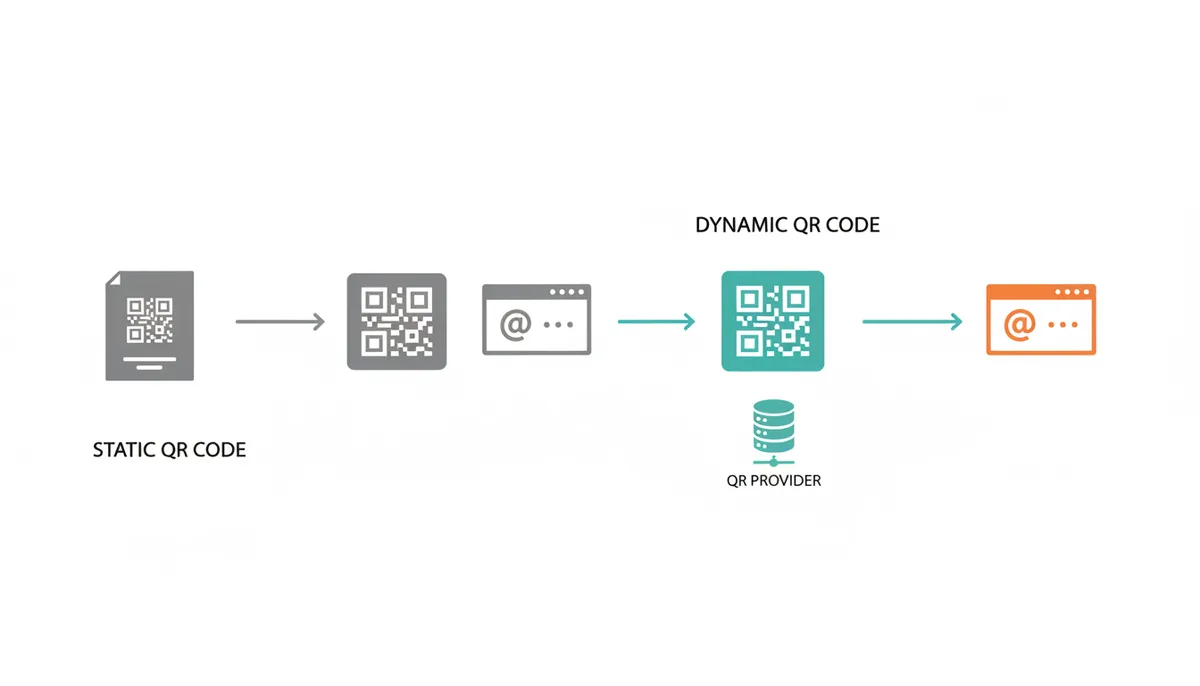
The magic isn’t in the code itself; it’s in the redirection. A static QR code is a direct line. It encodes the final URL—like yourwebsite.com/sale—directly into the pattern. When scanned, the phone goes straight there. No data is captured.
A dynamic QR code is a detour. It encodes a short, unique tracking URL from your QR code provider—like qrcm.com/abc123. When scanned, the phone goes to that provider’s server first. The server instantly logs the scan event, capturing data like timestamp, operating system, and approximate location. Then, it immediately redirects the user to your final URL. The user experience is seamless, but you get a full analytics report on the backend.
How to Create Your First Trackable QR Code (Step-by-Step)
Let’s build one. I’m using QR Code Machine for this example because its interface is built for this professional use case. The process is similar on other paid platforms.
- Choose ‘Dynamic QR Code’. This is the most critical step. On the QR Code Machine homepage, look for this option. It’s often behind a ‘Premium’ or ‘Start Free’ button. Never select ‘URL’ directly if you want tracking; that likely creates a static code.
- Enter Your Destination URL. Paste the full URL of your landing page. This is where you’ll add UTM parameters for deeper tracking in Google Analytics. For now, use
yourwebsite.com/landing-page. - Customize the Design.
- Add a Logo: Upload your company logo. To ensure scannability, manually select a High (H) error correction level before adding your logo. Keep the logo centered and modest in size to avoid covering the critical positioning patterns in the corners.
- Change Colors: Use your brand colors, but ensure very high contrast between the code and the background. Dark on light is safest.
- Add a Frame: This is your Call to Action. Use text like “Scan for Menu” or “Get the Discount.” It tells people why they should scan.
- Error Correction: Use ‘High’ if you’re adding a logo or using the code in a challenging environment. It offers the most damage protection but creates a denser code.
- Download the Right Format.
- PNG: Use this for websites, emails, or digital screens. It’s a raster format.
- SVG/PDF: Use only these for print. They are vector formats, meaning they can be scaled to any size without becoming blurry or pixelated. A fuzzy QR code won’t scan.
Critical Final Step: Before you send anything to print, test your final downloaded QR code image with multiple scanner apps on both iOS and Android devices. This catches any design or formatting issues early.
Your code is now active. Any scan will be logged in your dashboard.
How Do You Read and Interpret the Analytics?
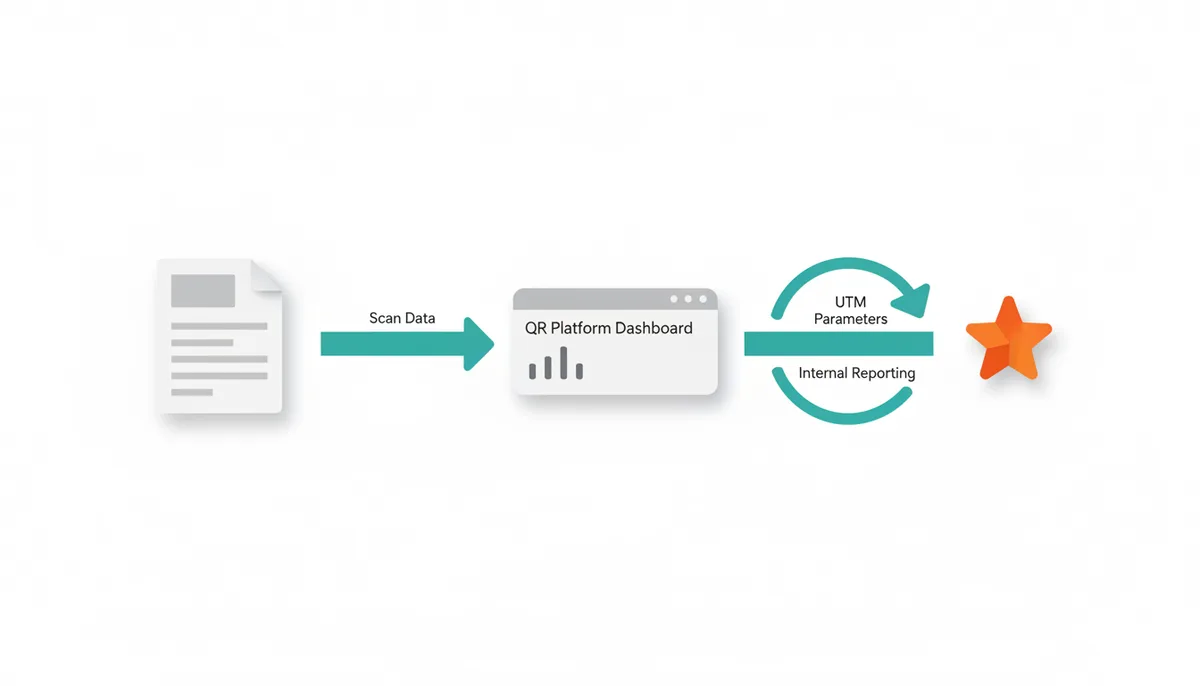
Your QR platform’s dashboard gives you the first layer of data. You’ll see:
- Total Scans: The raw number of scans.
- Unique Scans: A more valuable metric that deduplicates multiple scans from the same device, indicating your reach.
- Scans by Time: A graph showing peaks and troughs in engagement.
- Scans by Location: A map showing cities or countries where scans originated.
- Scans by Device: The breakdown of iOS vs. Android users.
This is good, but it doesn’t tell you what happened after the scan. For that, you need UTM parameters. When setting up your dynamic QR code, your destination URL should look like this:
yourwebsite.com/landing-page?utm_source=bus_shelter&utm_medium=qr_code&utm_campaign=spring_sale
Now, when a user is redirected, Google Analytics 4 sees this as a traffic source. The scan will appear in your GA4 acquisition reports with ‘qr_code’ as the medium and ‘bus_shelter’ as the source. You can then see session duration, conversions, and revenue directly attributed to that specific QR code.
What are the Most Common QR Code Campaign Mistakes?
I’ve seen campaigns fail for simple, avoidable reasons.
| Mistake | Bad Example | Good Example | Why It Matters |
|---|---|---|---|
| Low Contrast | Light blue QR code on a white background. | Solid black QR code on a pure white background. | The scanner's camera cannot distinguish the light-colored modules from the background, causing the scan to fail. |
| No Quiet Zone | A QR code printed edge-to-edge on a poster with no border. | A QR code surrounded by a clear white margin equal to at least four modules on all sides. | The quiet zone (the white border) is essential for scanners to identify where the code begins and ends. Without it, the scanner reads surrounding graphics as part of the code. |
| Broken Link | Linking a static QR code to a page that has been moved or deleted. | Using a dynamic QR code so the destination URL can be updated at any time after printing. | A scan that leads to a 404 error page destroys user trust, creates a dead end, and makes your brand look careless or outdated. |
| No Call to Action | A standalone QR code with no explanatory text or incentive. | A QR code integrated with a clear directive: "Scan to Unlock an Exclusive Discount." | People need a compelling reason to take out their phone and scan. A clear value proposition dramatically increases engagement and scan rates. |
| Non-Mobile Destination | Linking to a large, non-optimized PDF or a complex desktop website. | Linking to a fast-loading, mobile-optimized landing page or a progressive web app. | Virtually all scans occur on mobile devices. A poor mobile experience leads to immediate user frustration and abandonment, negating any value the scan provided. |
How Do You Choose the Right QR Code Platform?
Your choice depends on the scale of your operation. A free generator is for a one-time, personal use. A professional platform is for business.
| Feature | Free Generator | Professional Platform | Enterprise Solution |
|---|---|---|---|
| Dynamic (Editable) Codes | No | Yes | Yes |
| Analytics Dashboard | No | Basic to Advanced | Advanced with Exports |
| Custom Design & Logo | Limited | Yes | Yes |
| Vector Downloads (SVG/PDF) | No | Yes | Yes |
| Bulk Generation | No | Yes (limits may apply) | Yes (high volume) |
| API Access | No | Sometimes | Yes |
| Team Management | No | Yes | Yes |
For a marketing campaign, you need at least a Professional platform. The ability to edit the destination after printing, access to analytics, and high-resolution downloads are not luxuries; they are requirements.
What Advanced Tracking Strategies Can You Use?
Once you’ve mastered the basics, you can get sophisticated.
A/B Test Your Landing Pages: Create two dynamic QR codes with identical designs but different UTM parameters pointing to two different landing page versions (e.g., different offers or designs). Print each code on half your flyers. The scan data in your QR dashboard and the conversion data in GA4 will tell you which version performed better.
Use Smart Routing: A single dynamic QR code can be set up to send users to different places based on their device or location. An app download QR code can send iOS users to the App Store and Android users to Google Play. A restaurant code could send users to the delivery app popular in their specific country.
Retargeting Audiences: This is a powerful but advanced tactic. When a user scans your code and lands on your page, a tracking pixel (from Facebook, Google, etc.) can fire. You can then build a custom audience of "QR Code Scanners" and serve them targeted ads later, reminding them to complete a purchase or offering a follow-up deal.
How Do You Calculate the ROI of Your QR Code Campaign?
ROI is the ultimate metric. The formula is straightforward:
ROI = ((Value of Conversions from QR - Campaign Cost) / Campaign Cost) * 100
Here’s how to get the numbers for that formula using a real example.
Campaign Cost: Add up the cost of the QR code platform subscription (prorated for the campaign length), design time, and printing. For a local restaurant flyer campaign: $50 (platform) + $200 (design) + $250 (printing) = $500.
Value of Conversions: This is where your UTMs and GA4 goal tracking come in. In GA4, set up a ‘Conversion’ event for online reservations. The flyer’s QR code uses the UTM utm_campaign=spring_flyer. The GA4 report shows that the ‘spring_flyer’ campaign led to 30 conversions (reservations). If the average value of a reservation is $50, then the total value is 30 * $50 = $1500.
Plug it into the formula: (($1500 - $500) / $500) * 100 = 200% ROI.
You now have a definitive number to show that the campaign generated $2 for every $1 spent.
What's the Real Difference Between Static and Dynamic QR Codes?
It’s not just about tracking; it’s about function. A static QR code is like a tattoo—permanent and unchangeable. The data is physically encoded into the pattern of black and white squares. Once it’s printed, that’s it. You can’t change the destination, and you can’t get any data back from it. They’re fine for putting your Wi‑Fi password on the wall at home.
A dynamic QR code is more like a street sign. The sign itself stays the same, but where it points can change. The QR code pattern contains a short, fixed URL that points to a redirect service. That service holds the *real* destination URL in a database. When a scan happens, the service looks up the real URL, logs the scan data, and sends the user on their way. This mechanism is what enables everything: tracking, editing, and advanced features like geo‑routing.
The trade-off is dependency. A static code will work forever, even if the company that made it goes out of business. A dynamic code only works as long as the redirect service is online and your subscription is active. For any marketing material with a shelf life longer than a few months or a print run larger than 100 units, this dependency is a risk worth taking for the wealth of data and control you gain.
How to Design a QR Code That People Actually Want to Scan
The biggest barrier to a high scan rate isn't technology; it's psychology. People won’t scan a random black-and-white square. Your design must provide a reason and remove friction.
First, always include a Call to Action (CTA). The code itself is the how; the CTA is the why. "Scan to View the Menu" is good. "Scan to Get 10% Off Your Next Order" is better because it offers immediate, tangible value. Place the CTA directly above or below the code, or use a built-in frame that incorporates the text.
Second, brand it. A generic code looks suspicious. A code with your logo and colors looks official and builds trust. Most platforms, including QR Code Machine, let you upload a logo and adjust colors seamlessly. Just ensure you maintain high contrast. A dark blue code on a white background works. A light yellow code on a white background does not.
Third, consider the environment. Where will this be scanned?
- On a moving bus? The code needs to be large enough to scan quickly. Aim for at least 2 x 2 inches.
- On a bottle label? Test scan it on a curved surface. You may need a higher error correction level.
- In a dimly lit bar? Make sure the surrounding artwork provides enough light/dark contrast for the scanner to focus.
Your goal is to make the act of scanning feel like a natural, rewarding step, not a chore.
How to Integrate QR Scan Data with Your CRM and Marketing Stack
Basic analytics tell you what happened. Integration tells you who it happened to. Connecting your QR platform to your Customer Relationship Management (CRM) system like Salesforce or HubSpot turns a scan into a lead.
Here’s a worked example for a real estate agent hosting an open house:
- You create a dynamic QR code and place it on a sign-in sheet at the door. The destination URL is a simple web form on your website to collect name, email, and phone number.
- When a prospect scans the code, fills out the form, and submits it, two things happen:
- They are redirected to a "Thank You" page with the property details.
- The form submission data is sent to your CRM via an integration (often using Zapier or a native API) and creates a new lead.
- The lead in your CRM is automatically tagged with the source "QR Code - Open House [Property Address]".
Now, you know not just that 20 people scanned the code, but exactly who they are. You can see that John Smith scanned it, looked at the listing for 5 minutes, and then you can automatically add him to a drip email campaign for new listings in that neighborhood. The QR code moves from a measurement tool to a direct lead generation channel.
What Happens When Your QR Code Campaign Fails (And How to Fix It)
You launch your campaign and the scan count is zero. Don’t panic. This is a debugging process. Work through this checklist.
1. Test the Scan. Use multiple QR scanner apps on both iOS and Android. If it works in some apps but not others, the issue is likely with the scanner, not your code. If it doesn’t work in any app, the code is broken.
2. Test the Redirect. If the code scans but the page doesn’t load, the problem is with your destination URL.
- Did the URL change? (A dynamic code lets you fix this.)
- Is the landing page down?
- Is the URL case-sensitive? Avoid this.
3. Test the Environment. Is the code printed too small? Is there glare on a laminated surface? Is it placed around a corner where the light is bad? Go to the physical location and try to scan it yourself.
4. Test the Value Proposition. This is the hardest one to diagnose. Are people not scanning because they don’t see the point? Show the material to someone not on your team and ask them, "What would you expect to happen if you scanned this?" If they can’t tell you, your CTA is failing.
The most common catastrophic failure is using a static code, printing 50,000 brochures, and then discovering a typo in the URL. With a dynamic code, you fix the typo in the dashboard in 30 seconds and the campaign is saved.
How Much Does a Professional QR Code Campaign Actually Cost?
For a serious campaign, "free" is the most expensive option. You need a professional platform, and the cost is more about data and control than the code itself.
Costs break down into three areas:
1. The Platform Subscription: Most professional services like QR Code Machine operate on a monthly or annual subscription model. Plans typically range from $10–$50 per month. This gets you dynamic codes, basic to advanced analytics, and design tools. Enterprise plans with API access and bulk generation can run into the hundreds per month. This is your core operational cost.
2. Design and Production: This is often the largest cost. You need a graphic designer to incorporate the QR code seamlessly into your poster, flyer, or packaging. A freelance designer might charge $75–$150 per hour for this. Then you have the actual printing costs, which vary wildly based on quantity and material.
3. Measurement and Analysis: Your time has value. The cost of someone on your team spending time reviewing the analytics in the QR dashboard and Google Analytics, interpreting the data, and reporting on ROI must be factored into the total campaign cost.
For a small local campaign, your total cost might be $500 ($50 for the platform for a year, $200 for design, $250 for printing). A national print campaign could easily cost $50,000+. The QR code platform cost remains a tiny, fixed line item, but it’s the one that enables you to measure the return on that entire $50,000 investment.
Frequently Asked Questions
Can I track a static QR code?
No. A static QR code's destination is permanent and cannot be tracked because there is no intermediate server to log the scan. Only dynamic QR codes are trackable.
Do dynamic QR codes expire?
Yes, they can. Dynamic QR codes rely on a service to perform the redirection. They will continue to work as long as you have an active subscription with the provider. If the subscription lapses, the code will stop redirecting.
Can I change the destination URL after I've printed my QR code?
Yes, you can, but only if it's a dynamic QR code. You can log into your QR code generator's dashboard and update the final destination URL at any time without changing the printed code itself.
What's the difference between 'total scans' and 'unique scans'?
'Total scans' is the overall number of times your QR code has been scanned. 'Unique scans' counts only the first scan from each individual device, helping you understand your campaign's reach.
Does QR code tracking comply with privacy laws like GDPR?
Basic analytics—like scan time, device type, and general location (city/country)—are typically considered aggregated data and often fall under legitimate interest for business analytics. However, compliance becomes critical if you use QR codes to collect personal data (e.g., via a form that captures emails for your CRM) or to fire tracking pixels for ad retargeting. In these cases, you must provide a clear privacy notice at the point of data collection and, in many jurisdictions, obtain explicit user consent for cookies and data processing. Always consult legal counsel to ensure your specific implementation is compliant.
Will my trackable QR code work offline?
The QR code itself can be scanned offline, but the user's device needs an internet connection to access the tracking URL and be redirected to the final destination.
Sources
- Denso Wave — The origin and history of the QR code, and the technical explanation of its components like error correction levels.
- Information Commissioner's Office (ICO) — The principles of data privacy and lawful basis for processing under GDPR, relevant to the FAQ on privacy compliance.